NIO服务器(三)之Telnet层
本文基于 Dubbo 2.6.1 版本,望知悉。
1. 概述
本文接 《精尽 Dubbo 源码分析 —— NIO 服务器(二)之抽象 API》 一文,分享 dubbo-remoting-api 模块, telnet 包,Telnet 命令。
在 《Dubbo 用户指南 —— Telnet 命令参考手册》 一文中,我们可以看到,Dubbo 支持通过 telnet 命令,用来服务治理。其中,clear、exit、help、log、status 是通用指令,通过 telnet 包实现。而其它几个指令,需要不同协议( Protocol )自己实现。目前,仅有 Dubbo Protocol 实现了自定义指令。
本文涉及类图如下:
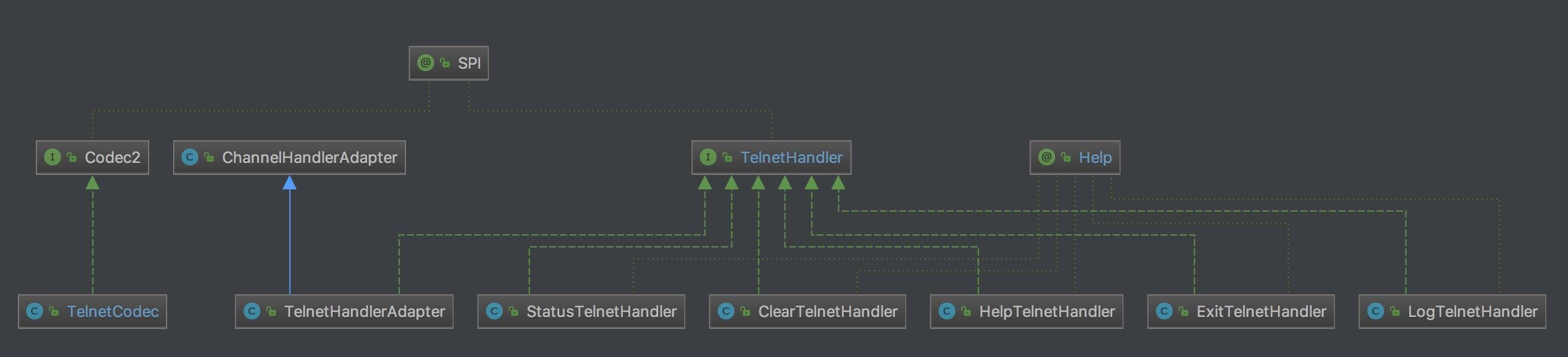
从用途上,上述类可以分成三种:
- TelnetCodec :负责编解码 Telnet 命令与结果。
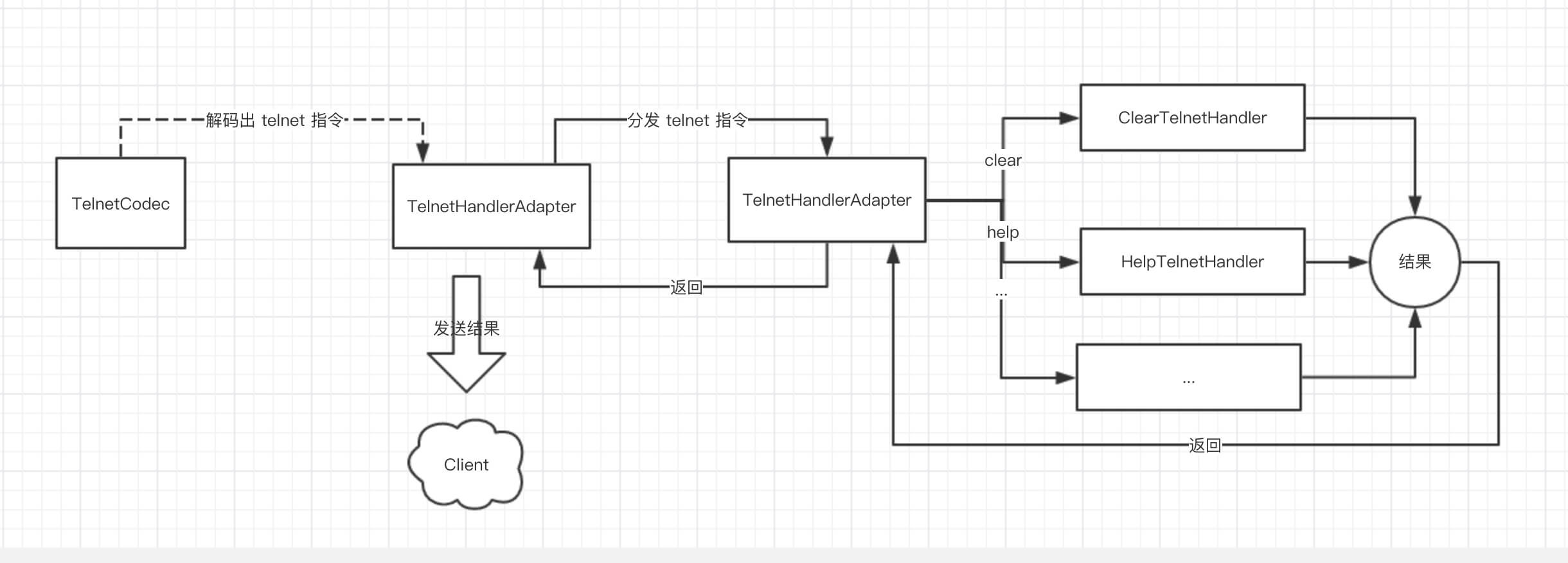
- TelnetHandlerAdapter :负责接收来自 HeaderExchangeHandler 的 telnet 命令,分发给对应的 TelnetHandler 实现类,进行处理,返回命令结果。
- 为什么来自 HeaderExchangeHandler,我们后续文章分享。
- XXXTelnetHandler :处理对应的 telnet 命令,返回结果。
流程如下图:
下面我们来看看具体的代码实现。
2. TelnetCodec
艿艿对 telnet server 不熟悉,如果有错误,还请包涵。本文主要起到抛砖的作用。
com.alibaba.dubbo.remoting.telnet.codec.TelnetCodec ,实现 TransportCodec 类,Telnet 命令编解码器。
解码
1
2
3
4
5
6
7
8
9
10
11
12
13
14
15
16
17
18
19
20
21
22
23
24
25
26
27
28
29
30
31
32
33
34
35
36
37
38
39
40
41
42
43
44
45
46
47
48
49
50
51
52
53
54
55
56
57
58
59
60
61
62
63
64
65
66
67
68
69
70
71
72
73
74
75
76
77
78
79
80
81
82
83
84
85
86
87
88
89
90
91
92
93
94
95
96
97
98
99
100
101
102
103
104
105
106
107
108
109
110
111
112
113
114
115
116
117
118
119
120
121
122
123
124
125
126
127
128
129
130
131
132
133
134
135
136
137
138
139
140
141
142
143
144
145
146
147
148
149
150
151
@SuppressWarnings("unchecked")
protected Object decode(Channel channel, ChannelBuffer buffer, int readable, byte[] message) throws IOException {
    // 【TODO 8025】为啥 client 侧,直接返回
    if (isClientSide(channel)) {
        return toString(message, getCharset(channel));
    }
    // 检查长度
    checkPayload(channel, readable);
    if (message == null || message.length == 0) {
        return DecodeResult.NEED_MORE_INPUT;
    }

    // 处理退格的情况。
    if (message[message.length - 1] == '\b') { // Windows backspace echo
        try {
            // 32=空格 8=退格
            boolean doublechar = message.length >= 3 && message[message.length - 3] < 0; // double byte char
            channel.send(new String(doublechar ? new byte[]{32, 32, 8, 8} : new byte[]{32, 8}, getCharset(channel).name()));
        } catch (RemotingException e) {
            throw new IOException(StringUtils.toString(e));
        }
        return DecodeResult.NEED_MORE_INPUT;
    }

    // 关闭指令
    for (Object command : EXIT) {
        if (isEquals(message, (byte[]) command)) {
            if (logger.isInfoEnabled()) {
                logger.info(new Exception("Close channel " + channel + " on exit command: " + Arrays.toString((byte[]) command)));
            }
            channel.close(); // 关闭通道
            return null;
        }
    }

    // 使用历史的命令
    boolean up = endsWith(message, UP);
    boolean down = endsWith(message, DOWN);
    if (up || down) {
        LinkedList<String> history = (LinkedList<String>) channel.getAttribute(HISTORY_LIST_KEY);
        if (history == null || history.isEmpty()) {
            return DecodeResult.NEED_MORE_INPUT;
        }
        // 获得历史命令数组的位置
        Integer index = (Integer) channel.getAttribute(HISTORY_INDEX_KEY);
        Integer old = index;
        if (index == null) {
            index = history.size() - 1;
        } else {
            if (up) { // 向上
                index = index - 1;
                if (index < 0) {
                    index = history.size() - 1;
                }
            } else { // 向下
                index = index + 1;
                if (index > history.size() - 1) {
                    index = 0;
                }
            }
        }
        // 获得历史命令,并发送给客户端
        if (old == null || !old.equals(index)) {
            // 设置当前位置
            channel.setAttribute(HISTORY_INDEX_KEY, index);
            // 获得历史命令
            String value = history.get(index);
            // 拼接退格,以清除客户端原有命令
            if (old != null && old >= 0 && old < history.size()) {
                String ov = history.get(old);
                StringBuilder buf = new StringBuilder();
                for (int i = 0; i < ov.length(); i++) {
                    buf.append("\b"); // 退格
                }
                for (int i = 0; i < ov.length(); i++) {
                    buf.append(" ");
                }
                for (int i = 0; i < ov.length(); i++) {
                    buf.append("\b"); // 退格
                }
                value = buf.toString() + value;
            }
            // 发送命令
            try {
                channel.send(value);
            } catch (RemotingException e) {
                throw new IOException(StringUtils.toString(e));
            }
        }
        // 返回,需要更多指令
        return DecodeResult.NEED_MORE_INPUT;
    }

    // 关闭指令
    for (Object command : EXIT) {
        if (isEquals(message, (byte[]) command)) {
            if (logger.isInfoEnabled()) {
                logger.info(new Exception("Close channel " + channel + " on exit command " + command));
            }
            channel.close();
            return null;
        }
    }
    // 查找是否回车结尾。若不是,说明一条 telnet 指令没结束。
    byte[] enter = null;
    for (Object command : ENTER) {
        if (endsWith(message, (byte[]) command)) {
            enter = (byte[]) command;
            break;
        }
    }
    if (enter == null) {
        return DecodeResult.NEED_MORE_INPUT;
    }
    // 移除历史命令数组的位置
    LinkedList<String> history = (LinkedList<String>) channel.getAttribute(HISTORY_LIST_KEY);
    Integer index = (Integer) channel.getAttribute(HISTORY_INDEX_KEY);
    channel.removeAttribute(HISTORY_INDEX_KEY);
    // 将历史命令拼接
    if (history != null && !history.isEmpty() && index != null && index >= 0 && index < history.size()) {
        String value = history.get(index);
        if (value != null) {
            byte[] b1 = value.getBytes();
            byte[] b2 = new byte[b1.length + message.length];
            System.arraycopy(b1, 0, b2, 0, b1.length);
            System.arraycopy(message, 0, b2, b1.length, message.length);
            message = b2;
        }
    }
    // 将命令字节数组,转成具体的一条命令
    String result = toString(message, getCharset(channel));
    // 添加到历史
    if (result.trim().length() > 0) {
        if (history == null) {
            history = new LinkedList<String>();
            channel.setAttribute(HISTORY_LIST_KEY, history);
        }
        if (history.isEmpty()) {
            history.addLast(result);
        } else if (!result.equals(history.getLast())) {
            // 添加当前命令到历史尾部
            history.remove(result);
            history.addLast(result);
            // 超过上限,移除历史的头部
            if (history.size() > 10) {
                history.removeFirst();
            }
        }
    }
    return result;
}
- 笔者在测试代码,使用了两种支持 telnet 连接的工具,从表现上存在差异:
- 使用
brew install telnet工具:每次输入完命令,敲完回车,Dubbo Server 才收到请求。 - 使用 ShellCraft 工具:每次输入任何一个字母,Dubbo Server 都会收到请求。
- 推荐两种工具都尝试下。
- 使用
- 第 3 至 6 行:【TODO 8025】为啥 client 侧,直接返回
- 第 7 至 11 行:调用
#checkPayload(channel, readable)方法,检查长度。 - 第 14 至 23 行:处理退格(《telnet编程 客户端 服务器》)的情况。例如在 ShellCraft 工具的情况下,输错一个字母时,使用退格键,需要向 Client 发送 32(空格) + 8(退格)。FROM:写服务器要自己处理很多情况,比如说我要删除一个字符。BS退格,但是不能删除,也没有相应的删除ASCII。这里可以这样处理:先向客户端发送退格,再发送空格(覆盖要删除的字符),再发送退格。这样就实现了删除一个位置的字符。
- 第 25 至 34 行:调用
#isEquals(message, command)方法,判断是否使用退出命令。若是,关闭连接。代码如下:
1
2
3
4
5
6
7
8
9
private static final List<?> EXIT = Arrays.asList(new Object[]{
    new byte[]{3} /* Windows Ctrl+C */,
    new byte[]{-1, -12, -1, -3, 6} /* Linux Ctrl+C */,
    new byte[]{-1, -19, -1, -3, 6} /* Linux Pause */
});

private static boolean isEquals(byte[] message, byte[] command) throws IOException {
    return message.length == command.length && endsWith(message, command);
}
- 第 36 至 92 行:通过向上或向下键,从 Dubbo Server 获得历史的命令。因为可以多次向上或向下,所以 Server 需要记录位置( Index )。相关代码如下:
1
2
3
4
5
6
7
8
9
10
11
12
13
14
15
16
/**
 * 历史命令列表
 */
private static final String HISTORY_LIST_KEY = "telnet.history.list";
/**
 * 历史命令位置(用户向上或向下)
 */
private static final String HISTORY_INDEX_KEY = "telnet.history.index";
/**
 * 向上
 */
private static final byte[] UP = new byte[]{27, 91, 65};
/**
 * 向下
 */
private static final byte[] DOWN = new byte[]{27, 91, 66};
代码比较复杂,有多种边界场景,胖友认真读下代码注释,并自己调试下。
- 第 95 至 103 行:关闭指令。历史命令的情况下。
- 第 104 至 114 行:调用
#endsWith(message, command)方法,查找是否回车结尾。若不是,说明一条 telnet 命令还没结束。
1
2
3
4
5
6
7
8
9
10
11
12
13
14
15
16
17
private static final List<?> ENTER = Arrays.asList(new Object[]{
    new byte[]{'\r', '\n'} /* Windows Enter */,
    new byte[]{'\n'} /* Linux Enter */
});

private static boolean endsWith(byte[] message, byte[] command) throws IOException {
    if (message.length < command.length) {
        return false;
    }
    int offset = message.length - command.length;
    for (int i = command.length - 1; i >= 0; i--) {
        if (message[offset + i] != command[i]) {
            return false;
        }
    }
    return true;
}
- 第 115 至 118 行:移除历史命令数组的位置。
- 第 119 至 129 行:将历史命令拼接到当前命令前面。此处会存在一个 Bug,复现流程如下:
- 1、输入
ls回车 - 2、输入
pwd,向上,回车。此处 Dubbo Server 解析的最终结果为lspwd。理论来说,应该是ls。
- 1、输入
- 第 131 行:将命令字节数组,转成具体的一条命令。
- 调用 #getCharset(channel) 方法,获得通道的字符集。代码比较简单,胖友点击查看。
- 调用
#toString(message, charset)方法,将命令字节数组,转成具体的一条命令。代码如下:
1
2
3
4
5
6
7
8
9
10
11
12
13
14
15
16
17
18
19
20
21
22
23
24
25
26
27
28
29
30
31
32
33
34
35
36
37
38
private static String toString(byte[] message, Charset charset) throws UnsupportedEncodingException {
    byte[] copy = new byte[message.length];
    int index = 0;
    for (int i = 0; i < message.length; i++) {
        byte b = message[i];
        // 退格,尾部减小
        if (b == '\b') { // backspace
            if (index > 0) {
                index--;
            }
            if (i > 2 && message[i - 2] < 0) { // double byte char
                if (index > 0) {
                    index--;
                }
            }
        // 换码(溢出)
        } else if (b == 27) { // escape
            if (i < message.length - 4 && message[i + 4] == 126) {
                i = i + 4;
            } else if (i < message.length - 3 && message[i + 3] == 126) {
                i = i + 3;
            } else if (i < message.length - 2) {
                i = i + 2;
            }
        // 握手
        } else if (b == -1 && i < message.length - 2
                && (message[i + 1] == -3 || message[i + 1] == -5)) { // handshake
            i = i + 2;
        } else {
            copy[index++] = message[i];
        }
    }
    if (index == 0) {
        return "";
    }
    // 创建字符串
    return new String(copy, 0, index, charset.name()).trim();
}
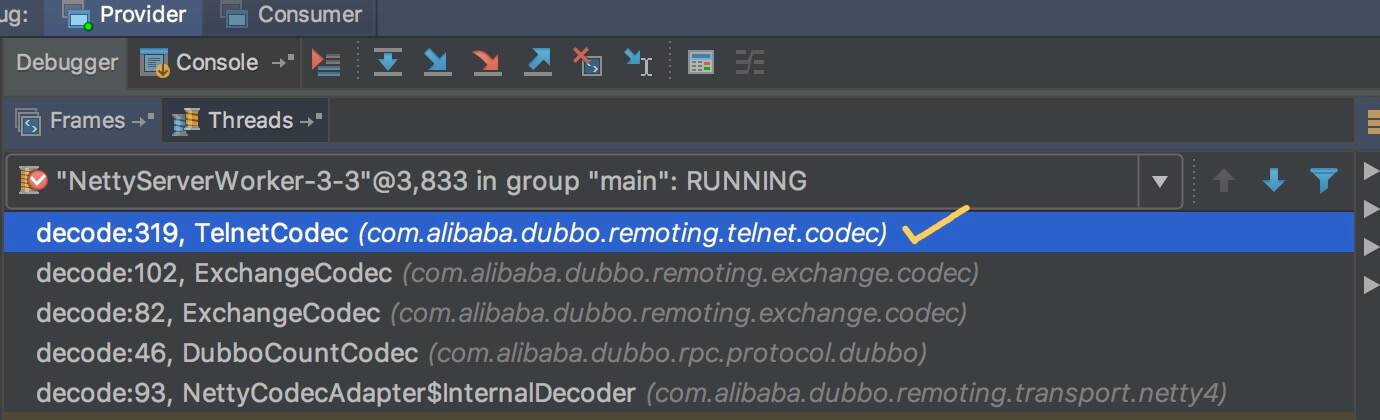
建议多调试,这样会更好理解。如下是 TelnetCodec 的被调用栈:
编码
1
2
3
4
5
6
7
8
9
10
11
12
13
14
public void encode(Channel channel, ChannelBuffer buffer, Object message) throws IOException {
    // telnet 命令结果
    if (message instanceof String) {
        if (isClientSide(channel)) { // 【TODO 8025】为啥 client 侧,需要多加 \r\n
            message = message + "\r\n";
        }
        // 写入
        byte[] msgData = ((String) message).getBytes(getCharset(channel).name());
        buffer.writeBytes(msgData);
    // 非 telnet 命令结果。目前不会出现
    } else {
        super.encode(channel, buffer, message);
    }
}
3. TelnetHandler
com.alibaba.dubbo.remoting.telnet.TelnetHandler,telnet 命令处理器。代码如下:
1
2
3
4
5
6
7
8
9
10
11
12
13
@SPI
public interface TelnetHandler {

    /**
     * telnet.
     * 处理 telnet 命令
     *
     * @param channel 通道
     * @param message telnet 命令
     */
    String telnet(Channel channel, String message) throws RemotingException;

}
@SPI拓展点注解,Dubbo SPI。- 每种 telnet 命令,对应一个 TelnetHandler 实现类。
4. TelnetHandlerAdapter
com.alibaba.dubbo.remoting.telnet.support.TelnetHandlerAdapter,实现 TelnetHandler 接口,继承 ChannelHandlerAdapter 类,telnet 处理器适配器,负责接收来自 HeaderExchangeHandler 的 telnet 命令,分发给对应的 TelnetHandler 实现类,进行处理,返回命令结果。代码如下:
1
2
3
4
5
6
7
8
9
10
11
12
13
14
15
16
17
18
19
20
21
22
23
24
25
26
27
28
29
30
31
32
33
34
35
36
37
38
39
40
41
42
43
44
45
46
47
48
49
50
51
52
53
54
55
56
public class TelnetHandlerAdapter extends ChannelHandlerAdapter implements TelnetHandler {

    private final ExtensionLoader<TelnetHandler> extensionLoader = ExtensionLoader.getExtensionLoader(TelnetHandler.class);

    @Override
    public String telnet(Channel channel, String message) throws RemotingException {
        // 处理 telnet 提示键
        String prompt = channel.getUrl().getParameterAndDecoded(Constants.PROMPT_KEY, Constants.DEFAULT_PROMPT);
        boolean noprompt = message.contains("--no-prompt");
        message = message.replace("--no-prompt", "");
        // 拆出 telnet 命令和参数
        StringBuilder buf = new StringBuilder();
        message = message.trim();
        String command; // 命令
        if (message.length() > 0) {
            int i = message.indexOf(' ');
            if (i > 0) {
                command = message.substring(0, i).trim(); // 命令
                message = message.substring(i + 1).trim(); // 参数
            } else {
                command = message; // 命令
                message = ""; // 参数
            }
        } else {
            command = ""; // 命令
        }
        if (command.length() > 0) {
            // 查找到对应的 TelnetHandler 对象,执行命令
            if (extensionLoader.hasExtension(command)) {
                try {
                    String result = extensionLoader.getExtension(command).telnet(channel, message);
                    if (result == null) {
                        return null;
                    }
                    buf.append(result);
                } catch (Throwable t) {
                    buf.append(t.getMessage());
                }
            // 查找不到对应的 TelnetHandler 对象,返回报错。
            } else {
                buf.append("Unsupported command: ");
                buf.append(command);
            }
        }
        // 添加 telnet 提示语
        if (buf.length() > 0) {
            buf.append("\r\n");
        }
        if (prompt != null && prompt.length() > 0 && !noprompt) {
            buf.append(prompt);
        }
        // 返回
        return buf.toString();
    }

}
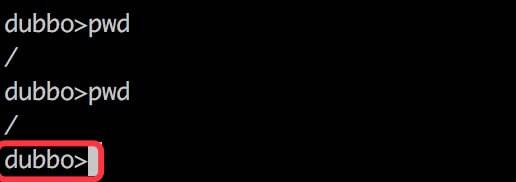
- 第 8 至 10 行:处理 telnet 提示语,默认为
"dubbo",可通过<dubbo:protocol prompt="xxx" />配置。提示语的效果,如下图所示红框部分:
- 第 11 至 26 行:拆除 telnet 命令和参数两部分。
- 第 28 至 38 行:查找到对应的 TelnetHandler 对象,执行命令,返回结果。
- 第 39 至 43 行:查找不到对应的 TelnetHandler 对象,返回报错提示。
- 第 45 至 53 行:添加 telnet 提示语,并最终返回。
下面我们来看下 HeaderExchangeHandler 对 TelnetHandlerAdapter 的调用,简化代码如下:
1
2
3
4
5
6
7
8
9
10
11
12
13
14
15
16
17
18
19
private final ExchangeHandler handler;

@Override
public void received(Channel channel, Object message) throws RemotingException {
    // ... 省略代码
    if (message instanceof String) {
        if (isClientSide(channel)) {
            Exception e = new Exception("Dubbo client can not supported string message: " + message + " in channel: " + channel + ", url: " + channel.getUrl());
            logger.error(e.getMessage(), e);
        } else {
            String echo = handler.telnet(channel, (String) message);
            if (echo != null && echo.length() > 0) {
                channel.send(echo);
            }
        }
    }

    // ... 省略代码
}
- 在该方法中,我们可以看到,会调用
handler的#telnet(channel, message)方法,处理 telnet 命令,并将执行命令的结果,发送给客户端。 - 可能胖友会懵逼,
handler不是 ExchangeHandler 类型么?在后面的文章,我们会看到 ExchangeHandler 实现 TelnetHandler 接口。
这样就完了么?不不不。为什么 TelnetHandlerAdapter 会继承 ChannelHandlerAdapter 类呢?因为后文会看到的 ExchangeHandlerAdapter,实现了 TelnetHandlerAdapter 类,而 Java 不支持多继承,所以使用 TelnetHandlerAdapter 继承 ChannelHandlerAdapter 类。多少有些无奈?这是艿艿的理解,也不一定正确,欢迎一起探讨。
5. TelnetHandler 命令实现
在 command 包下,我们可以看到多种 TelnetHandler 命令的实现类,如下图所示:
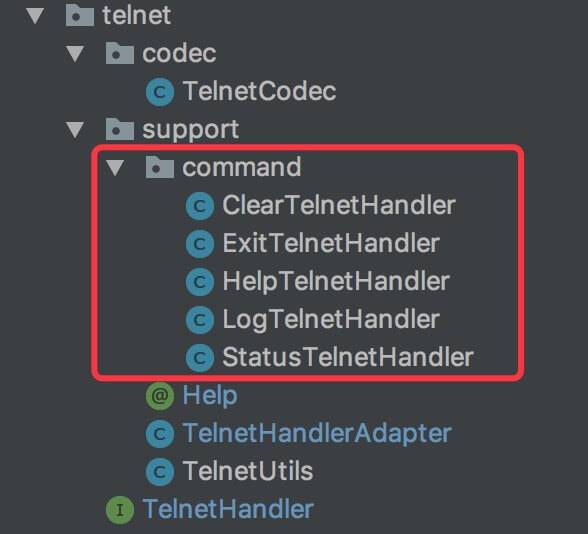
- ClearTelnetHandler
- ExitTelnetHandler
- HelpTelnetHandler
- LogTelnetHandler
- StatusTelnetHandler
具体每个类的实现,本文就省略,胖友对哪个感兴趣,可以自己瞅瞅。
在每个实现类上,我们会看到添加有 @Help 注解,用于每个 telnet 指令的帮助文档。代码如下:
1
2
3
4
5
6
7
8
9
10
11
12
13
14
15
16
17
18
19
20
21
@Documented
@Retention(RetentionPolicy.RUNTIME)
@Target({ElementType.TYPE})
public @interface Help {

    /**
     * 参数说明
     */
    String parameter() default "";

    /**
     * 简要提示
     */
    String summary();

    /**
     * 详细提示
     */
    String detail() default "";

}
666. 彩蛋
Dubbo 2.5.8 新版本重构了 telnet 模块,提供了新的 telnet 命令支持。
感兴趣的胖友,可以看下 《Dubbo 用户指南 —— 在线运维命令-QOS》