NIO服务器(三)之Telnet层
本文基于 Dubbo 2.6.1 版本,望知悉。
1. 概述
本文接 《精尽 Dubbo 源码分析 —— NIO 服务器(二)之抽象 API》 一文,分享 dubbo-remoting-api 模块, telnet 包,Telnet 命令。
在 《Dubbo 用户指南 —— Telnet 命令参考手册》 一文中,我们可以看到,Dubbo 支持通过 telnet 命令,用来服务治理。其中,clearexithelplogstatus通用指令,通过 telnet 包实现。而其它几个指令,需要不同协议( Protocol )自己实现。目前,仅有 Dubbo Protocol 实现了自定义指令。
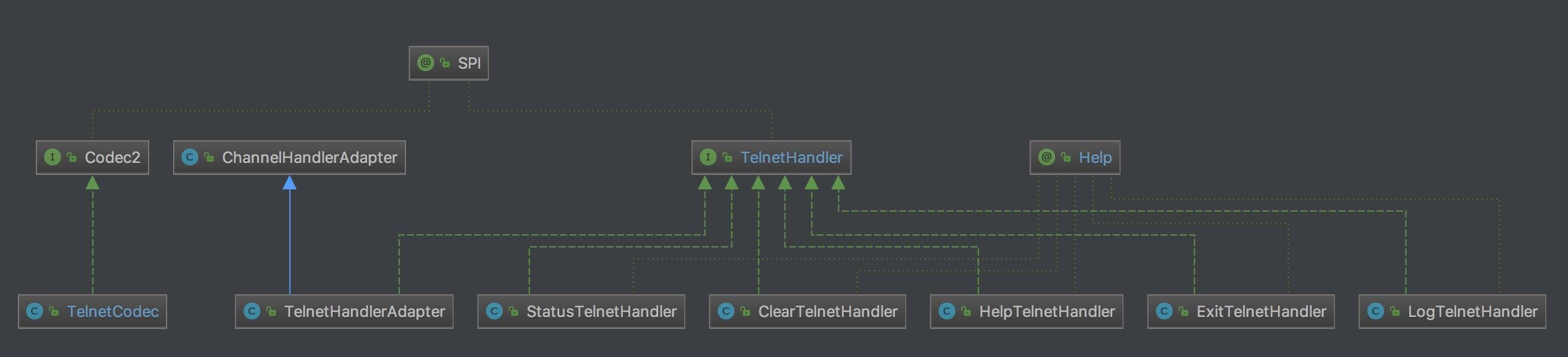
本文涉及类图如下:
类图
从用途上,上述类可以分成三种:
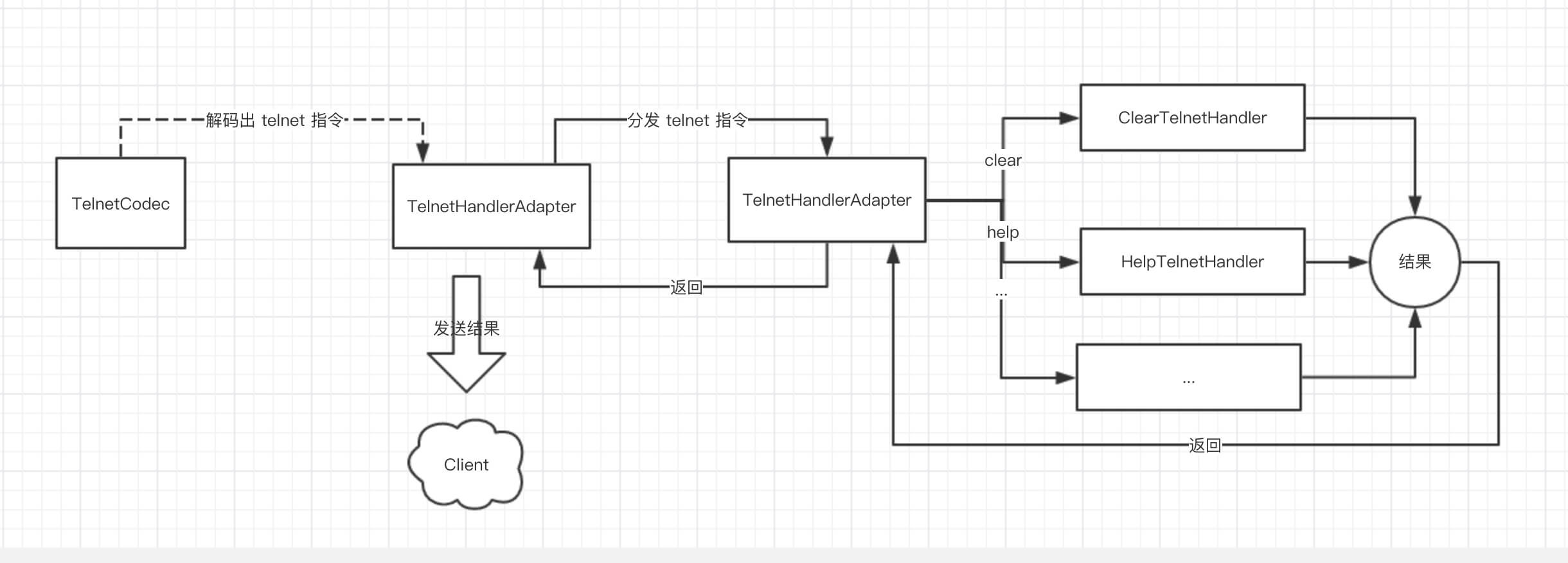
- TelnetCodec :负责编解码 Telnet 命令与结果。
- TelnetHandlerAdapter :负责接收来自 HeaderExchangeHandler 的 telnet 命令,分发给对应的 TelnetHandler 实现类,进行处理,返回命令结果 。
- 为什么来自 HeaderExchangeHandler ,我们后续文章分享。
- XXXTelnetHandler :处理对应的 telnet 命令,返回结果。
流程如下图:
流程
下面我们来看看具体的代码实现。
2. TelnetCodec
艿艿对 telnet server 不熟悉,如果有错误,还请包涵。 本文主要起到抛砖的作用。
com.alibaba.dubbo.remoting.telnet.codec.TelnetCodec ,实现 TransportCodec 类,Telnet 命令编解码器。
解码
```plain text plain 1: @SuppressWarnings(“unchecked”) 2: protected Object decode(Channel channel, ChannelBuffer buffer, int readable, byte[] message) throws IOException { 3: // 【TODO 8025】为啥 client 侧,直接返回 4: if (isClientSide(channel)) { 5: return toString(message, getCharset(channel)); 6: } 7: // 检查长度 8: checkPayload(channel, readable); 9: if (message == null || message.length == 0) { 10: return DecodeResult.NEED_MORE_INPUT; 11: } 12: 13: // 处理退格的情况。 14: if (message[message.length - 1] == ‘\b’) { // Windows backspace echo 15: try { 16: // 32=空格 8=退格 17: boolean doublechar = message.length >= 3 && message[message.length - 3] < 0; // double byte char 18: channel.send(new String(doublechar ? new byte[]{32, 32, 8, 8} : new byte[]{32, 8}, getCharset(channel).name())); 19: } catch (RemotingException e) { 20: throw new IOException(StringUtils.toString(e)); 21: } 22: return DecodeResult.NEED_MORE_INPUT; 23: } 24: 25: // 关闭指令 26: for (Object command : EXIT) { 27: if (isEquals(message, (byte[]) command)) { 28: if (logger.isInfoEnabled()) { 29: logger.info(new Exception(“Close channel “ + channel + “ on exit command: “ + Arrays.toString((byte[]) command))); 30: } 31: channel.close(); // 关闭通道 32: return null; 33: } 34: } 35: 36: // 使用历史的命令 37: boolean up = endsWith(message, UP); 38: boolean down = endsWith(message, DOWN); 39: if (up || down) { 40: LinkedList
1
2
3
4
5
6
7
8
9
10
11
12
13
14
15
16
17
18
19
20
21
22
23
24

---

- 笔者在测试代码,使用了两种支持 telnet 连接的工具,从表现上存在差异:
    - 使用
brew install telnet
工具:每次输入完命令,敲完回车,Dubbo Server 才收到请求。
    - 使用 ShellCraft 工具:每次输入**任何一个**
字母,Dubbo Server 都会收到请求。
    - 推荐两种工具都尝试下。
- 第 3 至 6 行:【TODO 8025】为啥 client 侧,直接返回
- 第 7 至 11 行:调用
#checkPayload(channel, readable)
方法,检查长度。
- 第 14 至 23 行:处理**退格**[《telnet编程 客户端 服务器》](http://blog.51cto.com/wchrt/1627262)
的情况。例如在 ShellCraft 工具的情况下,输错一个字母时,使用退格键,需要向 Client 发送 32( 空格 ) + 8( 退格 )。
FROM
写服务器要自己处理很多情况,比如说我要删除一个字符。BS退格,但是不能删除,也没有相应的删除ASCII。这里可以这样处理:先向客户端发送退格,再发送空格(覆盖要删除的字符),再发送退格。这样就实现了删除一个位置的字符。
- 第 25 至 34 行:调用
#isEquals(message, command)
方法,判断是否使用退出命令。若是,关闭连接。代码如下:

```plain text
plain private static final List<?> EXIT = Arrays.asList(new Object[]{new byte[]{3} /* Windows Ctrl+C */, new byte[]{-1, -12, -1, -3, 6} /* Linux Ctrl+C */, new byte[]{-1, -19, -1, -3, 6} /* Linux Pause */});  private static boolean isEquals(byte[] message, byte[] command) throws IOException {     return message.length == command.length && endsWith(message, command); }
- 第 36 至 92 行:通过向上向下 或 键,从 Dubbo Server 获得历史的命令。因为可以多次向上或向下,所以 Server 需要记录位置( Index )。相关代码如下:
```plain text plain /** * 历史命令列表 */ private static final String HISTORY_LIST_KEY = “telnet.history.list”; /** * 历史命令位置(用户向上或向下) */ private static final String HISTORY_INDEX_KEY = “telnet.history.index”; /** * 向上 */ private static final byte[] UP = new byte[]{27, 91, 65}; /** * 向下 */ private static final byte[] DOWN = new byte[]{27, 91, 66};
1
2
3
4
5

---

```plain text
- <font style="color:rgb(51, 51, 51);"> 代码比较复杂,有多种边界场景,胖友认真读下代码注释,并自己调试下。</font>
- 第 95 至 103 行:关闭指令。历史命令的情况下 。
- 第 104 至 114 行:调用 回车 #endsWith(message, command) 方法,查找是否 结尾。若不是,说明一条 telnet 命令还没结束。
```plain text plain private static final List<?> ENTER = Arrays.asList(new Object[]{new byte[]{‘\r’, ‘\n’} /* Windows Enter /, new byte[]{‘\n’} / Linux Enter */}); private static boolean endsWith(byte[] message, byte[] command) throws IOException { if (message.length < command.length) { return false; } int offset = message.length - command.length; for (int i = command.length - 1; i >= 0; i–) { if (message[offset + i] != command[i]) { return false; } } return true; }
1
2
3
4
5
6
7
8
9
10
11
12
13
14
15
16
17
18
19
20
21
22
23
24
25

---

- 第 115 至 118 行:移除历史命令数组的位置。
- 第 119 至 129 行:将历史命令拼接到当前命令**前面**
。此处会存在一个 Bug ,复现流程如下:
    - 1、输入
ls
回车
    - 2、输入
pwd
,向上,回车。此处 Dubbo Server 解析的最终结果为
lspwd
。理论来说,应该是
ls
。
- 第 131 行:将命令字节数组,转成具体的一条命令。
    - 调用 [#getCharset(channel)](https://github.com/apache/incubator-dubbo/blob/bb8884e04433677d6abc6f05c6ad9d39e3dcf236/dubbo-remoting/dubbo-remoting-api/src/main/java/com/alibaba/dubbo/remoting/telnet/codec/TelnetCodec.java#L55-L85)
方法,获得通道的字符集。 代码比较简单,胖友点击查看。
    - 调用
#toString(message, charset)
方法,将命令字节数组,转成具体的一条命令。代码如下:

```plain text
plain private static String toString(byte[] message, Charset charset) throws UnsupportedEncodingException {             byte[] copy = new byte[message.length];             int index = 0;             for (int i = 0; i < message.length; i++) {                 byte b = message[i];                 // 退格,尾部减小                 if (b == '\b') { // backspace                     if (index > 0) {                         index--;                     }                     if (i > 2 && message[i - 2] < 0) { // double byte char                         if (index > 0) {                             index--;                         }                     }                 // 换码(溢出)                 } else if (b == 27) { // escape                     if (i < message.length - 4 && message[i + 4] == 126) {                         i = i + 4;                     } else if (i < message.length - 3 && message[i + 3] == 126) {                         i = i + 3;                     } else if (i < message.length - 2) {                         i = i + 2;                     }                 // 握手                 } else if (b == -1 && i < message.length - 2                         && (message[i + 1] == -3 || message[i + 1] == -5)) { // handshake                     i = i + 2;                 } else {                     copy[index++] = message[i];                 }             }             if (index == 0) {                 return "";             }             // 创建字符串             return new String(copy, 0, index, charset.name()).trim();         }
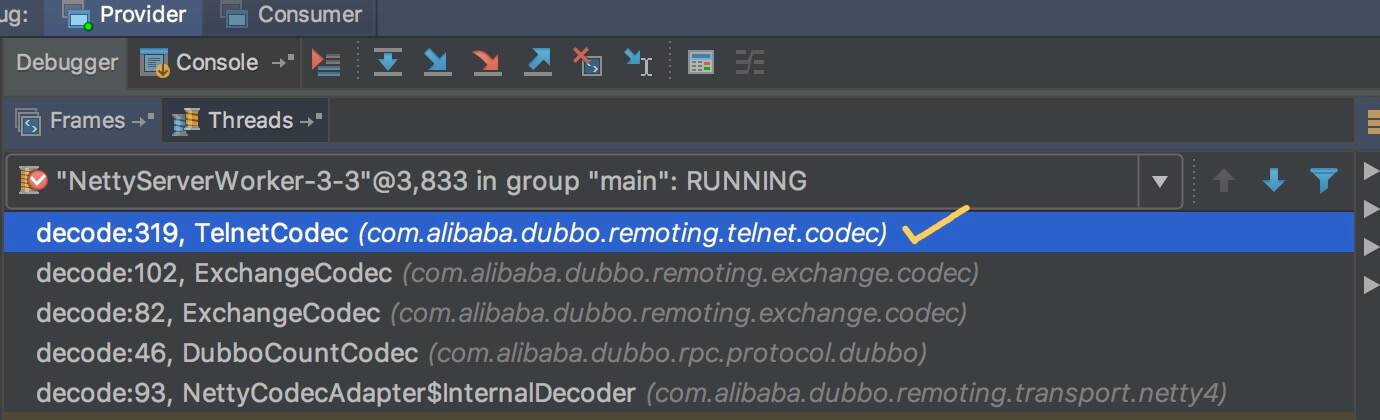
- x 建议多调试,这样会更好理解。 如下是 TelnetCodec 的被
调用栈
:
编码
```plain text Java public void encode(Channel channel, ChannelBuffer buffer, Object message) throws IOException { // telnet 命令结果 if (message instanceof String) { if (isClientSide(channel)) { // 【TODO 8025】为啥 client 侧,需要多加 \r\n message = message + “\r\n”; } // 写入 byte[] msgData = ((String) message).getBytes(getCharset(channel).name()); buffer.writeBytes(msgData); // 非 telnet 命令结果。目前不会出现 } else { super.encode(channel, buffer, message); } }
1
2
3
4
5
6
7
8
9

---

# 3. TelnetHandler

com.alibaba.dubbo.remoting.telnet.TelnetHandler ,telnet 命令处理器。代码如下:

```plain text
plain @SPI public interface TelnetHandler {      /**      * telnet.      * 处理 telnet 命令      *      * @param channel 通道      * @param message telnet 命令      */     String telnet(Channel channel, String message) throws RemotingException;  }
- @SPI拓展点 注解,Dubbo SPI 。
- 每种 telnet 命令,对应一个 TelnetHandler 实现类。
4. TelnetHandlerAdapter
com.alibaba.dubbo.remoting.telnet.support.TelnetHandlerAdapter ,实现 TelnetHandler 接口,继承 ChannelHandlerAdapter 类,telnet 处理器适配器,负责接收来自 HeaderExchangeHandler 的 telnet 命令,分发给对应的 TelnetHandler 实现类,进行处理,返回命令结果。代码如下:
```plain text plain 1: public class TelnetHandlerAdapter extends ChannelHandlerAdapter implements TelnetHandler { 2: 3: private final ExtensionLoader
1
2
3
4
5
6
7
8
9
10
11
12
13
14
15
16
17
18
19
20
---
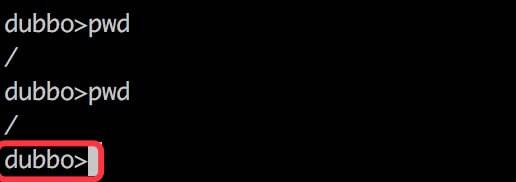
- 第 8 至 10 行:处理 telnet 提示语,默认为
“dubbo”
,可通过
配置。提示语的效果,如下图所示红框部分:
提示语
- 第 11 至 26 行:拆除 telnet 命令和参数**两**
部分。
- 第 28 至 38 行:查找到对应的 TelnetHandler 对象,执行命令,返回结果。
- 第 39 至 43 行:查找不到对应的 TelnetHandler 对象,返回**报错提示**
。
- 第 45 至 53 行:添加 telnet 提示语,并最终返回。
下面我们来看下 HeaderExchangeHandler 对 TelnetHandlerAdapter 的调用,简化代码如下:
```plain text
plain private final ExchangeHandler handler; @Override public void received(Channel channel, Object message) throws RemotingException { // ... 省略代码 if (message instanceof String) { if (isClientSide(channel)) { Exception e = new Exception("Dubbo client can not supported string message: " + message + " in channel: " + channel + ", url: " + channel.getUrl()); logger.error(e.getMessage(), e); } else { String echo = handler.telnet(channel, (String) message); if (echo != null && echo.length() > 0) { channel.send(echo); } } } // ... 省略代码 }
- 在该方法中,我们可以看到,会调用 handler 的 #telnet(channel, message) 方法,处理 telnet 命令,并将执行命令的结果,发送给客户端。
- 可能胖友会懵逼, handler 不是 ExchangeHandler 类型么?在后面的文章,我们会看到 ExchangeHandler 实现 TelnetHandler 接口。
这样就完了么?不不不。为什么 TelnetHandlerAdapter 会继承 ChannelHandlerAdapter 类呢?因为后文会看到的 ExchangeHandlerAdapter ,实现了 TelnetHandlerAdapter 类,而 Java 不支持多继承,所以使用 TelnetHandlerAdapter 继承 ChannelHandlerAdapter 类。多少有些无奈?这是艿艿的理解,也不一定正确,欢迎一起探讨。
5. TelnetHandler 命令实现
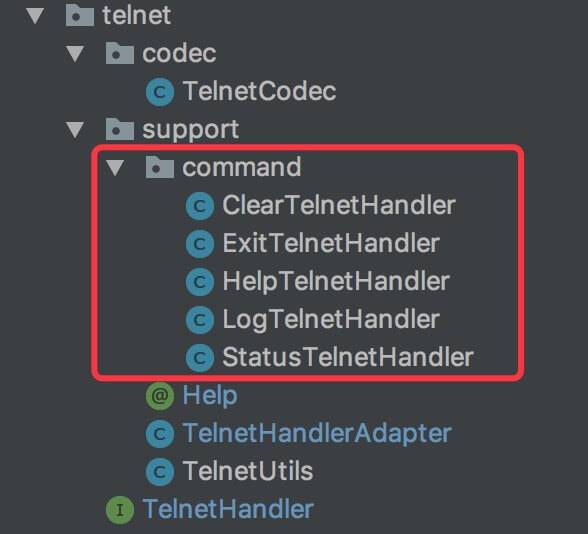
在 command 包下,我们可以看到多种 TelnetHandler 命令的实现类,如下图所示:
command
- ClearTelnetHandler
- ExitTelnetHandler
- HelpTelnetHandler
- LogTelnetHandler
- StatusTelnetHandler
具体每个类的实现,本文就省略,胖友对哪个感兴趣,可以自己瞅瞅。
在每个实现类上,我们会看到添加有 @Help 注解,用于每个 telnet 指令的帮助文档。代码如下:
plain text plain @Documented @Retention(RetentionPolicy.RUNTIME) @Target({ElementType.TYPE}) public @interface Help { /** * 参数说明 */ String parameter() default ""; /** * 简要提示 */ String summary(); /** * 详细提示 */ String detail() default ""; }
666. 彩蛋
Dubbo 2.5.8 新版本重构了 telnet 模块,提供了新的 telnet 命令支持。
感兴趣的胖友,可以看下 《Dubbo 用户指南 —— 在线运维命令-QOS》