服务调用(六)之远程调用(REST)
本文基于 Dubbo 2.6.1 版本,望知悉。
1. 概述
本文,我们分享 rest:// 协议的远程调用,主要分成三个部分:
- 服务暴露
- 服务引用
- 服务调用
对应项目为 dubbo-rpc-rest 。
对应文档为 《在Dubbo中开发REST风格的远程调用(RESTful Remoting)》 。
我们基于标准的 Java REST API——JAX-RS 2.0(Java API for RESTful Web Services s的简写),为 dubbo 提供了接近透明的 REST 调用支持。由于完全兼容 Java 标准 AP I,所以为 dubbo 开发的所有REST服务,未来脱离 dubbo 或者任何特定的 REST 底层实现一般也可以正常运行。
下面,我们来看看 JAX-RS 的简介:
JAX-RS 是标准的 Java REST API ,得到了业界的广泛支持和应用,其著名的开源实现就有很多,包括 Oracle 的 Jersey ,RedHat 的 Resteasy ,Apache 的 CXF 和 Wink ,以及restlet 等等。另外,所有支持 JavaEE 6.0 以上规范的商用 JavaEE 应用服务器都对 JAX-RS 提供了支持。因此,JAX-RS 是一种已经非常成熟的解决方案,并且采用它没有任何所谓 vendor lock-in 的问题。
在 dubbo-rpc-rest 项目中,目前使用使用的是 RedHat 的 Resteasy 。在 pom.xml 引入如下:
1
2
3
4
5
6
7
8
9
10
11
<dependency>
    <groupId>org.jboss.resteasy</groupId>
    <artifactId>resteasy-jaxrs</artifactId>
</dependency>

<dependency>
    <groupId>org.jboss.resteasy</groupId>
    <artifactId>resteasy-client</artifactId>
</dependency>

// 还有其他可选的 resteasy 相关的引用,此处暂时省略。
因为本文会涉及到大量的 Resteasy 的原理,艿艿看了 《RESTEASY ,从学会使用到了解原理》 ,觉得非常不错,胖友一定要看噢。 也就是说,本文不会重复详细分享 Resteasy 的原理,哈哈哈。
本文涉及的类,如下图:
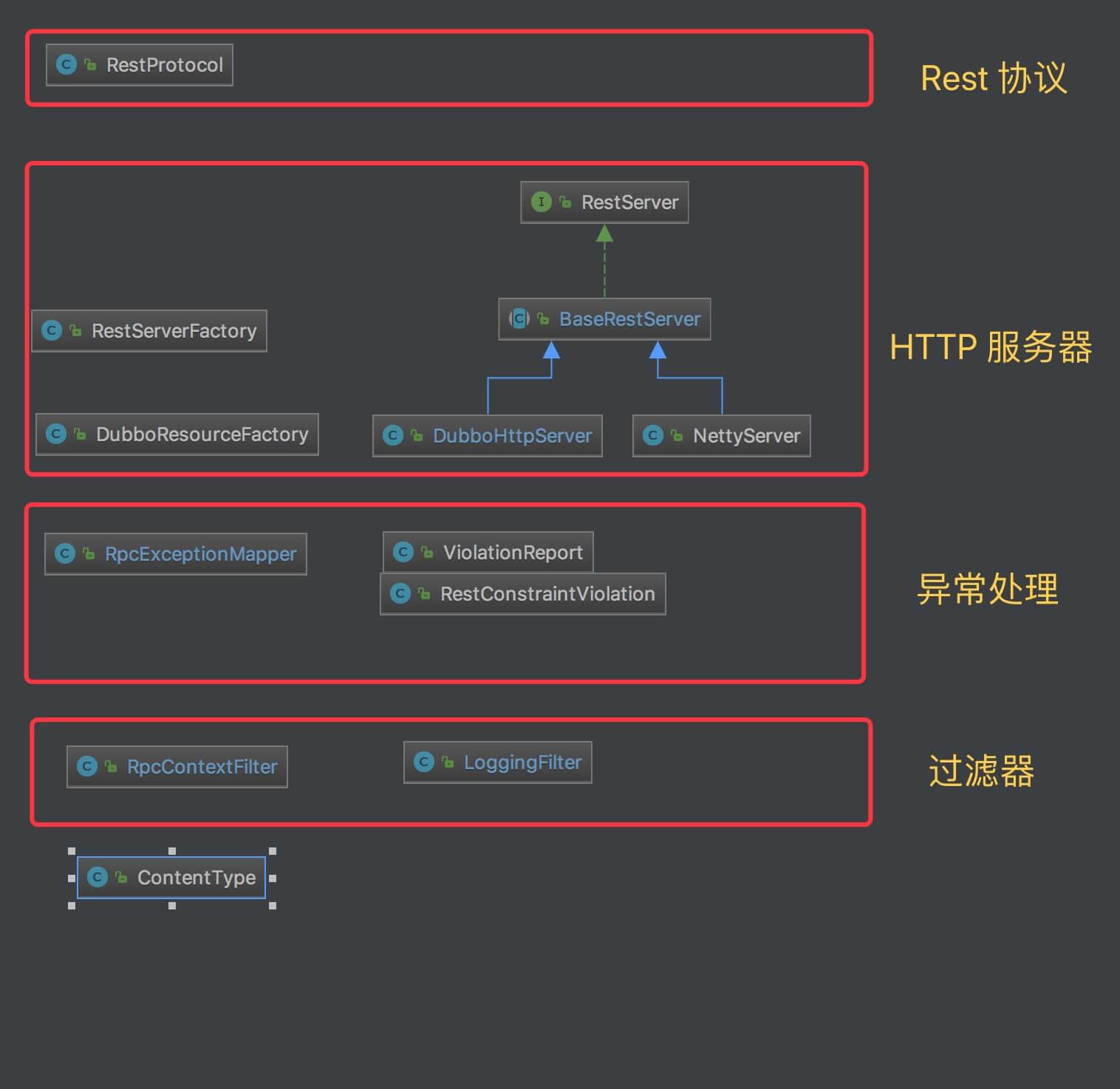
我们先来看看 RestProtocol 的实现代码,然后再看其他层的实现。
2. RestProtocol
com.alibaba.dubbo.rpc.protocol.rest.RestProtocol ,实现 AbstractProxyProtocol 抽象类,rest:// 协议实现类。
2.1 构造方法
1
2
3
4
5
6
7
8
9
10
11
12
13
14
15
16
17
18
19
20
21
22
23
24
25
26
27
28
29
30
31
32
33
34
35
36
/**
 * 服务器默认端口
 */
private static final int DEFAULT_PORT = 80;

/**
 * 服务器集合
 *
 * key:ip:port
 */
private final Map<String, RestServer> servers = new ConcurrentHashMap<String, RestServer>();
/**
 * 服务器工厂,负责创建服务器
 */
private final RestServerFactory serverFactory = new RestServerFactory();
/**
 * 客户端数组
 */
// TODO in the future maybe we can just use a single rest client and connection manager
private final List<ResteasyClient> clients = Collections.synchronizedList(new LinkedList<ResteasyClient>());
/**
 * 连接监控器
 */
private volatile ConnectionMonitor connectionMonitor;

public RestProtocol() {
    super(WebApplicationException.class, ProcessingException.class);
}

public void setHttpBinder(HttpBinder httpBinder) {
    serverFactory.setHttpBinder(httpBinder);
}

public int getDefaultPort() {
    return DEFAULT_PORT;
}
- 服务暴露相关属性:servers、serverFactory。
- 服务引用相关属性:clients、connectionMonitor。
- rpcExceptions = WebApplicationException.class 和 ProcessingException.class。
- #setHttpBinder(httpBinder) 方法,在 RestProtocol 对象创建时,被 Dubbo SPI 机制调用,向 serverFactory 注入 httpBinder 属性。为什么这么做?在 RestServerFactory 的实现代码中,我们会看到原因。
2.2 doExport
1
2
3
4
5
6
7
8
9
10
11
12
13
14
15
16
17
18
19
20
21
22
23
24
25
26
27
28
29
30
31
32
33
34
35
36
37
38
39
40
41
42
43
44
45
46
47
48
49
50
51
52
53
@Override
protected <T> Runnable doExport(T impl, Class<T> type, URL url) throws RpcException {
    // 获得服务器地址
    String addr = getAddr(url);
    // 获得服务的真实类名,例如 DemoServiceImpl
    Class implClass = ServiceClassHolder.getInstance().popServiceClass();
    // 获得 RestServer 对象。若不存在,进行创建。
    RestServer server = servers.get(addr);
    if (server == null) {
        server = serverFactory.createServer(url.getParameter(Constants.SERVER_KEY, "jetty"));
        server.start(url); // 启动
        servers.put(addr, server);
    }

    // 获得 ContextPath 路径。
    String contextPath = getContextPath(url);
    if ("servlet".equalsIgnoreCase(url.getParameter(Constants.SERVER_KEY, "jetty"))) { // 外部的容器,需要从 ServletContext 中获得。
        ServletContext servletContext = ServletManager.getInstance().getServletContext(ServletManager.EXTERNAL_SERVER_PORT);
        if (servletContext == null) {
            throw new RpcException("No servlet context found. Since you are using server='servlet', " +
                    "make sure that you've configured " + BootstrapListener.class.getName() + " in web.xml");
        }
        String webappPath = servletContext.getContextPath();
        if (StringUtils.isNotEmpty(webappPath)) {
            // 去掉 `/` 起始
            webappPath = webappPath.substring(1);
            // 校验 URL 中配置的 `contextPath` 是外部容器的 `contextPath` 起始。
            if (!contextPath.startsWith(webappPath)) {
                throw new RpcException("Since you are using server='servlet', " +
                        "make sure that the 'contextpath' property starts with the path of external webapp");
            }
            // 截取掉起始部分
            contextPath = contextPath.substring(webappPath.length());
            // 去掉 `/` 起始
            if (contextPath.startsWith("/")) {
                contextPath = contextPath.substring(1);
            }
        }
    }
    // 获得以 `@Path` 为注解的基础类,一般情况下,我们直接在 `implClass` 上添加了该注解,即就是 `implClass` 类。
    final Class resourceDef = GetRestful.getRootResourceClass(implClass) != null ? implClass : type;
    // 部署到服务器上
    server.deploy(resourceDef, impl, contextPath);
    // 返回取消暴露的回调 Runnable
    final RestServer s = server;
    return new Runnable() {
        public void run() {
            // TODO due to dubbo's current architecture,
            // it will be called from registry protocol in the shutdown process and won't appear in logs
            s.undeploy(resourceDef);
        }
    };
}
- 第 4 行:调用 #getAddr(url) 方法,获得服务器地址 ip:port。
- 第 6 行:调用 ServiceClassHolder#popServiceClass() 方法,获得服务的真实类名,例如:DemoServiceImpl 。在 ServiceConfig 初始化时,会调用如下代码:
1
ServiceClassHolder.getInstance().pushServiceClass(getServiceClass(ref));
当然,这不是一个优雅的实现,未来可能会重构优化这块的代码。
- 第 7 至 13 行:从 servers 中,获得 RestServer 对象。若不存在,调用 RestServerFactory#createServer(url) 方法进行创建,并且,调用 RestServer#start(url) 方法,进行启动。
- 第 15 至 39 行:调用 #getContextPath(url) 方法,获得 ContextPath 路径。代码如下:
1
2
3
4
protected String getContextPath(URL url) {
    int pos = url.getPath().lastIndexOf("/"); // 尾部 / 之后
    return pos > 0 ? url.getPath().substring(0, pos) : "";
}
- 第 41 行:获得以 @Path 为注解的基础类,一般情况下,我们直接在 implClass 上添加了该注解,即就是 implClass 类。当然,官方有一段话非常关键,如下:
在Dubbo 中开发 REST 服务主要都是通过 JAX-RS 的 annotation 来完成配置的,在上面的示例中,我们都是将 annotation 放在服务的实现类中。但其实,我们完全也可以将 annotation 放到服务的接口上,这两种方式是完全等价的。
在一般应用中,我们建议将 annotation 放到服务实现类,这样 annotation 和 java 实现代码位置更接近,更便于开发和维护。另外更重要的是,我们一般倾向于避免对接口的污染,保持接口的纯净性和广泛适用性。
【关键】如果接口和实现类都同时添加了annotation,则实现类的 annotation 配置会生效,接口上的 annotation 被直接忽略。
- 第 43 行:调用 RestServer#deploy(resourceDef, impl, contextPath) 方法,部署 Service 到服务器上。到了此处,服务暴露就已经完成,那么请求是如何调度到 Service 的呢?在 「3. RestServer」 详细解析。
- 第 44 至 52 行:返回取消暴露的回调 Runnable 。
2.3 doRefer
1
2
3
4
5
6
7
8
9
10
11
12
13
14
15
16
17
18
19
20
21
22
23
24
25
26
27
28
29
30
31
32
33
34
35
36
37
38
39
40
41
42
43
44
45
46
47
48
49
50
51
52
53
54
55
56
57
58
59
60
61
62
63
64
65
66
67
68
69
70
71
72
@Override
protected <T> T doRefer(Class<T> serviceType, URL url) throws RpcException {
    // 创建 ConnectionMonitor 对象。
    if (connectionMonitor == null) {
        connectionMonitor = new ConnectionMonitor();
    }

    // 创建 HttpClient 连接池管理器
    // TODO more configs to add
    PoolingHttpClientConnectionManager connectionManager = new PoolingHttpClientConnectionManager();
    // 20 is the default maxTotal of current PoolingClientConnectionManager
    connectionManager.setMaxTotal(url.getParameter(Constants.CONNECTIONS_KEY, 20)); // 最大请求数
    connectionManager.setDefaultMaxPerRoute(url.getParameter(Constants.CONNECTIONS_KEY, 20)); // 每个路由,最大请求数
    // 添加到 ConnectionMonitor 中。
    connectionMonitor.addConnectionManager(connectionManager);

    // 创建 RequestConfig 对象
    RequestConfig requestConfig = RequestConfig.custom()
            .setConnectTimeout(url.getParameter(Constants.TIMEOUT_KEY, Constants.DEFAULT_TIMEOUT)) // 连接超时
            .setSocketTimeout(url.getParameter(Constants.TIMEOUT_KEY, Constants.DEFAULT_TIMEOUT)) // 请求超时
            .build();
    // 创建 SocketConfig 对象
    SocketConfig socketConfig = SocketConfig.custom()
            .setSoKeepAlive(true) // 保持连接
            .setTcpNoDelay(true)
            .build();
    // 创建 HttpClient 对象 【Apache】
    CloseableHttpClient httpClient = HttpClientBuilder.create()
            .setKeepAliveStrategy(new ConnectionKeepAliveStrategy() { // 优先以服务器返回的为准,缺省为 30 秒。
                public long getKeepAliveDuration(HttpResponse response, HttpContext context) {
                    HeaderElementIterator it = new BasicHeaderElementIterator(response.headerIterator(HTTP.CONN_KEEP_ALIVE));
                    while (it.hasNext()) {
                        HeaderElement he = it.nextElement();
                        String param = he.getName();
                        String value = he.getValue();
                        if (value != null && param.equalsIgnoreCase("timeout")) {
                            return Long.parseLong(value) * 1000;
                        }
                    }
                    // TODO constant
                    return 30 * 1000;
                }
            })
            .setDefaultRequestConfig(requestConfig)
            .setDefaultSocketConfig(socketConfig)
            .build();

    // 创建 ApacheHttpClient4Engine 对象 【Resteasy】
    ApacheHttpClient4Engine engine = new ApacheHttpClient4Engine(httpClient/*, localContext*/);
    // 创建 ResteasyClient 对象 【Resteasy】
    ResteasyClient client = new ResteasyClientBuilder().httpEngine(engine).build();
    // 添加到客户端集合
    clients.add(client);

    // 设置 RpcContextFilter 过滤器
    client.register(RpcContextFilter.class);
    // 从 `extension` 配置项,设置对应的组件(过滤器 Filter 、拦截器 Interceptor 、异常匹配器 ExceptionMapper 等等)。
    for (String clazz : Constants.COMMA_SPLIT_PATTERN.split(url.getParameter(Constants.EXTENSION_KEY, ""))) {
        if (!StringUtils.isEmpty(clazz)) {
            try {
                client.register(Thread.currentThread().getContextClassLoader().loadClass(clazz.trim()));
            } catch (ClassNotFoundException e) {
                throw new RpcException("Error loading JAX-RS extension class: " + clazz.trim(), e);
            }
        }
    }

    // 创建 Service Proxy 对象。
    // TODO protocol
    ResteasyWebTarget target = client.target("http://" + url.getHost() + ":" + url.getPort() + "/" + getContextPath(url));
    return target.proxy(serviceType);
}
- 第 3 至 6 行:创建 ConnectionMonitor 对象。
- 第 8 至 15 行:创建 HttpClient 连接池管理器,设置请求数相关配置,并且添加到 ConnectionMonitor 中。
- 第 17 至 46 行:创建 Apache HttpClient 对象。
- 第 17 至 21 行:创建 RequestConfig 对象,设置超时相关配置。
- 第 22 至 26 行:创建 SocketConfig 对象,设置连接相关配置。
- 第 29 至 43 行:创建 ConnectionKeepAliveStrategy 对象,优先以服务器返回 Keep-Alive 为准,缺省为 30 秒。参见文章 《HttpClient4.5.2 连接管理》 的 2.6. 连接存活策略 :
Http 规范没有规定一个持久连接应该保持存活多久。有些 Http 服务器使用非标准的 Keep-Alive 头消息和客户端进行交互,服务器端会保持数秒时间内保持连接。HttpClient 也会利用这个头消息。如果服务器返回的响应中没有包含 Keep-Alive 头消息,HttpClient会认为这个连接可以永远保持。然而,很多服务器都会在不通知客户端的情况下,关闭一定时间内不活动的连接,来节省服务器资源。在某些情况下默认的策略显得太乐观,我们可能需要自定义连接存活策略。
- 第 48 至 53 行:创建 Resteasy ResteasyClient 对象,并且添加到客户端集合 clients 中。
- 第 55 行:调用 ResteasyClient#register(Class<?> componentClass) 方法,注册 RpcContextFilter 到 ResteasyClient 中。
- 第 57 至 66 行:从 extension 配置项,设置对应的组件(过滤器 Filter 、拦截器 Interceptor 、异常匹配器 ExceptionMapper 等等)。详细说明,参见 《在Dubbo中开发REST风格的远程调用(RESTful Remoting)》 的 添加自定义的Filter、Interceptor等 。
- 第 68 至 71 行:创建 ResteasyWebTarget 对象,并调用 ResteasyWebTarget#proxy(serviceType) 方法,创建 Service Proxy 对象。
- 注意注解,上文也提到了,如果使用 Dubbo rest:// Consumer ,需要将 JAX-RS 的注解到 Service 接口类中,否则,请求的参数和方法的参数,无法映射上。
2.3.1 getErrorCode
1
2
3
4
5
@Override
protected int getErrorCode(Throwable e) {
    // TODO
    return super.getErrorCode(e);
}
- 目前,暂未实现异常翻译成 Dubbo 的错误码。
- 一般情况下,我们不使用 Dubbo rest:// Consumer ,而是让 Dubbo 暴露 dubbo:// 服务,使用 Dubbo dubbo:// Consumer 。
2.3.2 ConnectionMonitor
1
2
3
4
5
6
7
8
9
10
11
12
13
14
15
16
17
18
19
20
21
22
23
24
25
26
27
28
29
30
31
32
33
34
35
36
37
38
39
40
41
42
43
44
45
46
protected class ConnectionMonitor extends Thread {

    /**
     * 是否关闭
     */
    private volatile boolean shutdown;
    /**
     * HttpClient 连接池管理器集合
     */
    private final List<PoolingHttpClientConnectionManager> connectionManagers = Collections.synchronizedList(new LinkedList<PoolingHttpClientConnectionManager>());

    public void addConnectionManager(PoolingHttpClientConnectionManager connectionManager) {
        connectionManagers.add(connectionManager);
    }

    @Override
    public void run() {
        try {
            while (!shutdown) {
                synchronized (this) {
                    // 等待 1000 ms
                    wait(1000); // 可被下面 shutdown() 方法,强行关闭
                    for (PoolingHttpClientConnectionManager connectionManager : connectionManagers) {
                        connectionManager.closeExpiredConnections();
                        // TODO constant
                        connectionManager.closeIdleConnections(30, TimeUnit.SECONDS);
                    }
                }
            }
        } catch (InterruptedException ex) {
            shutdown();
        }
    }

    public void shutdown() {
        // 标记关闭
        shutdown = true;
        // 清除管理器集合
        connectionManagers.clear();
        // 唤醒等待线程
        synchronized (this) {
            notifyAll();
        }
    }

}
- 为什么有了连接池,还需要有这样一个 Monitor 呢?参见文章 《HttpClient4.5.2 连接管理》 的 2.5. 连接回收策略 :
经典阻塞 I/O 模型的一个主要缺点就是只有当组侧 I/O 时,socket 才能对 I/O 事件做出反应。当连接被管理器收回后,这个连接仍然存活,但是却无法监控socket的状态,也无法对 I/O 事件做出反馈。如果连接被服务器端关闭了,客户端监测不到连接的状态变化(也就无法根据连接状态的变化,关闭本地的 socket )。
HttpClient为了缓解这一问题造成的影响,会在使用某个连接前,监测这个连接是否已经过时,如果服务器端关闭了连接,那么连接就会失效。这种过时检查并不是 100% 有效,并且会给每个请求增加 10 到 30 毫秒额外开销。唯一一个可行的,且 does not involve a one thread per socket model for idle connections 的解决办法,是建立一个监控线程,来专门回收由于长时间不活动而被判定为失效的连接。这个监控线程可以周期性的调用 ClientConnectionManager 类的 closeExpiredConnections() 方法来关闭过期的连接,回收连接池中被关闭的连接。它也可以选择性的调用 ClientConnectionManager 类的 closeIdleConnections() 方法来关闭一段时间内不活动的连接。
2.4 destroy
1
2
3
4
5
6
7
8
9
10
11
12
13
14
15
16
17
18
19
20
21
22
23
24
25
26
27
28
29
30
31
32
33
34
35
36
@Override
public void destroy() {
    // 父类销毁
    super.destroy();

    // 关闭 ConnectionMonitor
    if (connectionMonitor != null) {
        connectionMonitor.shutdown();
    }

    // 关闭服务器
    for (Map.Entry<String, RestServer> entry : servers.entrySet()) {
        try {
            if (logger.isInfoEnabled()) {
                logger.info("Closing the rest server at " + entry.getKey());
            }
            entry.getValue().stop();
        } catch (Throwable t) {
            logger.warn("Error closing rest server", t);
        }
    }
    servers.clear();

    // 关闭客户端
    if (logger.isInfoEnabled()) {
        logger.info("Closing rest clients");
    }
    for (ResteasyClient client : clients) {
        try {
            client.close();
        } catch (Throwable t) {
            logger.warn("Error closing rest client", t);
        }
    }
    clients.clear();
}
3. Server
3.1 RestServer
com.alibaba.dubbo.rpc.protocol.rest.RestServer ,Rest Server 接口。方法如下:
1
2
3
4
5
6
7
8
9
10
11
12
13
14
15
16
17
18
19
20
21
22
23
24
25
26
27
28
29
30
31
public interface RestServer {

    /**
     * 启动服务器
     *
     * @param url URL 对象
     */
    void start(URL url);

    /**
     * 停止服务器
     */
    void stop();

    /**
     * 部署服务
     *
     * @param resourceDef 服务类
     * @param resourceInstance 服务对象
     * @param contextPath ContextPath
     */
    void deploy(Class resourceDef, Object resourceInstance, String contextPath);

    /**
     * 取消服务
     *
     * @param resourceDef 服务类
     */
    void undeploy(Class resourceDef);

}
- 两对方法:start(…) 和 stop() 方法,#deploy(…) 和 undeploy(…) 方法。
3.2 BaseRestServer
com.alibaba.dubbo.rpc.protocol.rest.BaseRestServer ,实现 RestServer 接口,Rest Server 抽象基类。
3.2.1 抽象方法
1
2
3
protected abstract ResteasyDeployment getDeployment();

protected abstract void doStart(URL url);
3.2.2 start
1
2
3
4
5
6
7
8
9
10
11
12
13
14
15
16
17
@Override
public void start(URL url) {
    // 添加 MediaType
    getDeployment().getMediaTypeMappings().put("json", "application/json");
    getDeployment().getMediaTypeMappings().put("xml", "text/xml");
//    server.getDeployment().getMediaTypeMappings().put("xml", "application/xml");
    // 添加过滤器 RpcContextFilter
    getDeployment().getProviderClasses().add(RpcContextFilter.class.getName());
    // TODO users can override this mapper, but we just rely on the current priority strategy of resteasy
    // 添加异常匹配 RpcExceptionMapper
    getDeployment().getProviderClasses().add(RpcExceptionMapper.class.getName());
    // 从 `extension` 配置项,添加对应的组件(过滤器 Filter 、拦截器 Interceptor 、异常匹配器 ExceptionMapper 等等)
    loadProviders(url.getParameter(Constants.EXTENSION_KEY, ""));

    // 启动服务器
    doStart(url);
}
- 第 3 至 5 行:添加 json、xml 两个 MediaType 。
- 第 8 行:添加过滤器 RpcContextFilter 。这个过滤器,我们在 ResteasyClient 的初始化时,也看到了。
- 第 9 行:添加异常匹配 RpcExceptionMapper 。
- 第 13 行:调用 #loadProviders(value) 方法,从 extension 配置项,添加对应的组件(过滤器 Filter 、拦截器 Interceptor 、异常匹配器 ExceptionMapper 等等)。这块代码,们在 ResteasyClient 的初始化时,也看到了。代码如下:
1
2
3
4
5
6
7
protected void loadProviders(String value) {
    for (String clazz : Constants.COMMA_SPLIT_PATTERN.split(value)) {
        if (!StringUtils.isEmpty(clazz)) {
            getDeployment().getProviderClasses().add(clazz.trim());
        }
    }
}
- 第 16 行:调用抽象 #doStart(url) 方法,启动服务器。
3.2.3 deploy
1
2
3
4
5
6
7
8
@Override
public void deploy(Class resourceDef, Object resourceInstance, String contextPath) {
    if (StringUtils.isEmpty(contextPath)) {
        getDeployment().getRegistry().addResourceFactory(new DubboResourceFactory(resourceInstance, resourceDef));
    } else {
        getDeployment().getRegistry().addResourceFactory(new DubboResourceFactory(resourceInstance, resourceDef), contextPath);
    }
}
- 调用 ResteasyDeployment#addResourceFactory(ResourceFactory) 方法,部署 Service 服务。这里,如果类比 SpringMVC ,就是添加 @RestController 注解的类。
- com.alibaba.dubbo.rpc.protocol.rest.DubboResourceFactory ,比较易懂,胖友自己看哈。
- 到了此处,我们就可以看一下 Resteasy 的请求处理过程,如下图所示:
FROM 《RESTEASY ,从学会使用到了解原理》 基础上修改
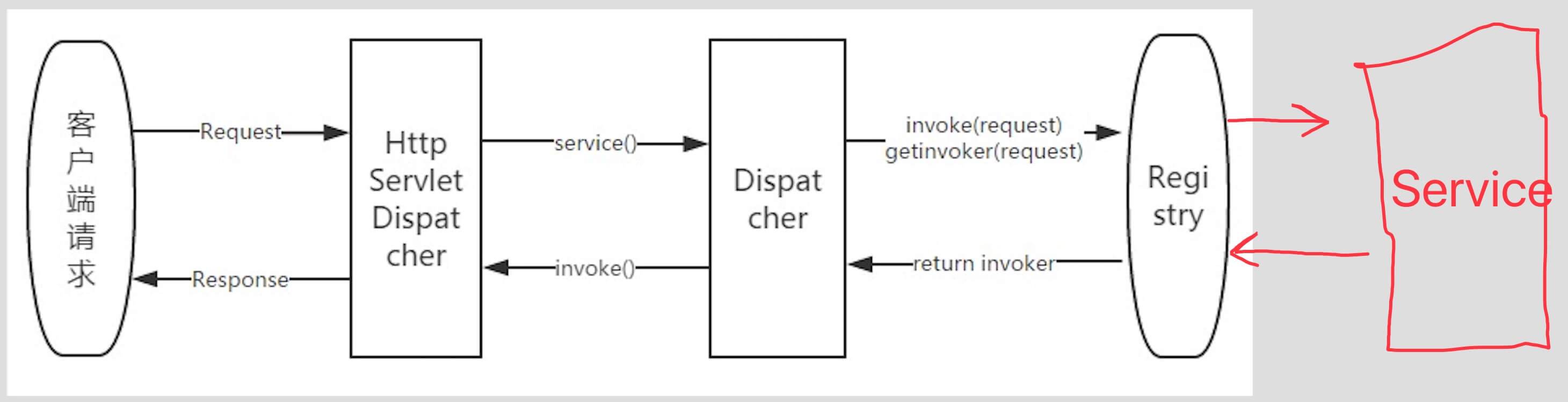
- HttpServletDispatcher :接受并分发客户端 http 请求
- ResourceFactory :负责处理客户端请求的对象由谁来负责处理
- Registry :
- 服务器启动时加载用户自定义Rest资源时,会解析上面的注解,并将注解相对路径和该类中执行的方法建立对应关系注册到 Registry 中。
- 当客户端请求过来时会根据请求中的相对路径去 Registry 中查找对应的 Invoker 对象,然后执行并将处理结果返回。
是不是一下子就清晰了,世界又明亮了?!
3.2.4 undeploy
1
2
3
4
@Override
public void undeploy(Class resourceDef) {
    getDeployment().getRegistry().removeRegistrations(resourceDef);
}
3.3 NettyHttpServer
com.alibaba.dubbo.rpc.protocol.rest.NettyHttpServer ,实现 BaseRestServer 抽象基类,基于 Netty 的 HTTP 服务器实现类。
注意,NettyHttpServer 不是 Servlet Container ,所以不能使用 @Context 注解。
3.3.1 doStart
1
2
3
4
5
6
7
8
9
10
11
12
13
14
15
16
17
18
19
private final NettyJaxrsServer server = new NettyJaxrsServer();

@Override
protected void doStart(URL url) {
    // 设置 NettyJaxrsServer 的属性
    String bindIp = url.getParameter(Constants.BIND_IP_KEY, url.getHost());
    if (!url.isAnyHost() && NetUtils.isValidLocalHost(bindIp)) {
        server.setHostname(bindIp); // Hostname
    }
    server.setPort(url.getParameter(Constants.BIND_PORT_KEY, url.getPort())); // Port
    Map<ChannelOption, Object> channelOption = new HashMap<ChannelOption, Object>();
    channelOption.put(ChannelOption.SO_KEEPALIVE, url.getParameter(Constants.KEEP_ALIVE_KEY, Constants.DEFAULT_KEEP_ALIVE)); // Keep-Alive
    server.setChildChannelOptions(channelOption);
    server.setExecutorThreadCount(url.getParameter(Constants.THREADS_KEY, Constants.DEFAULT_THREADS)); // 执行线程数
    server.setIoWorkerCount(url.getParameter(Constants.IO_THREADS_KEY, Constants.DEFAULT_IO_THREADS)); // IO 线程数
    server.setMaxRequestSize(url.getParameter(Constants.PAYLOAD_KEY, Constants.DEFAULT_PAYLOAD)); // 请求最大长度
    // 启动 NettyJaxrsServer
    server.start();
}
- server 属性,Netty4 对 Resteasy Server 的实现。
- 第 3 至 14 行:设置 NettyJaxrsServer 的属性。
- 第 16 行:调用 NettyJarxrsServer#start() 方法,启动服务器。
3.3.2 stop
1
2
3
4
@Override
public void stop() {
    server.stop();
}
3.3.3 getDeployment
1
2
3
4
@Override
protected ResteasyDeployment getDeployment() {
    return server.getDeployment();
}
3.4 DubboHttpServer
com.alibaba.dubbo.rpc.protocol.rest.DubboHttpServer ,实现 BaseRestServer 抽象基类,基于 dubbo-remoting-http 的 HTTP 服务器实现类。
3.4.1 构造方法
1
2
3
4
5
6
7
8
9
10
11
12
13
14
15
16
17
18
19
20
/**
 * Resteasy HttpServletDispatcher
 */
private final HttpServletDispatcher dispatcher = new HttpServletDispatcher();
/**
 * Resteasy ResteasyDeployment
 */
private final ResteasyDeployment deployment = new ResteasyDeployment();
/**
 * Dubbo HttpBinder$Adaptive
 */
private HttpBinder httpBinder;
/**
 * HttpServer 对象
 */
private HttpServer httpServer;

public DubboHttpServer(HttpBinder httpBinder) {
    this.httpBinder = httpBinder;
}
- DubboHttpServer 相比 NettyHttpServer 的请求流程会复杂一些,Dubbo DispatcherServlet => Dubbo RestHandler => Resteasy HttpServletDispatcher => … 。
3.4.2 doStart
1
2
3
4
5
6
7
8
9
10
11
12
13
14
15
16
17
18
19
20
21
22
23
24
25
@Override
protected void doStart(URL url) {
    // 创建 HttpServer 对象,使用 RestHandler 作为处理器。
    // TODO jetty will by default enable keepAlive so the xml config has no effect now
    httpServer = httpBinder.bind(url, new RestHandler());

    // 获得 ServletContext 对象
    ServletContext servletContext = ServletManager.getInstance().getServletContext(url.getPort());
    if (servletContext == null) {
        servletContext = ServletManager.getInstance().getServletContext(ServletManager.EXTERNAL_SERVER_PORT);
    }
    if (servletContext == null) {
        throw new RpcException("No servlet context found. If you are using server='servlet', " +
                "make sure that you've configured " + BootstrapListener.class.getName() + " in web.xml");
    }
    // 设置 ResteasyDeployment
    servletContext.setAttribute(ResteasyDeployment.class.getName(), deployment); // https://github.com/resteasy/Resteasy/blob/master/server-adapters/resteasy-undertow/src/main/java/org/jboss/resteasy/plugins/server/undertow/UndertowJaxrsServer.java#L74

    // 初始化 Resteasy HttpServletDispatcher
    try {
        dispatcher.init(new SimpleServletConfig(servletContext));
    } catch (ServletException e) {
        throw new RpcException(e);
    }
}
- 第 5 行:调用 HttpBinder#bind(url, handler) 方法,创建 HttpServer 对象,使用 RestHandler 作为处理器。
- 第 7 至 17 行:获得 ServletContext 对象,设置 ResteasyDeployment 到属性 。
- 为什么是 ResteasyDeployment.class.getName() 呢?参见 UndertowJaxrsServer 的代码。
- 第 19 至 24 行:调用 HttpServletDispatcher#init(ServletConfig) 方法,初始化 Resteasy 调度器。
- SimpleServletConfig ,主要是实现 ServletName 为 “DispatcherServlet” 。
3.4.3 stop
1
2
3
4
@Override
public void stop() {
    httpServer.close();
}
3.4.4 getDeployment
1
2
3
4
@Override
protected ResteasyDeployment getDeployment() {
    return deployment;
}
3.4.5 RestHandler
1
2
3
4
5
6
7
8
9
10
11
private class RestHandler implements HttpHandler {

    @Override
    public void handle(HttpServletRequest request, HttpServletResponse response) throws IOException, ServletException {
        // 设置
        RpcContext.getContext().setRemoteAddress(request.getRemoteAddr(), request.getRemotePort());
        // 调度请求
        dispatcher.service(request, response);
    }

}
- 实现 HttpHandler 接口。
- 调用 HttpServletDispatcher#service(request, response) 方法,调度请求,给 Resteasy HttpServletDispatcher 。
3.5 RestServerFactory
com.alibaba.dubbo.rpc.protocol.rest.RestServerFactory ,创建 RestServer 的工厂。
代码比较简单,胖友自己看看。
4. Filter
这是 JAX-RS中的 Filter ,而不是 Dubbo 的 Filter 。
4.1 RpcContextFilter
com.alibaba.dubbo.rpc.protocol.rest.RpcContextFilter ,实现 ContainerRequestFilter 和 ClientRequestFilter 接口,处理 RpcContext 的 Filter 实现类。
- Client Filter :通过将 Dubbo RpcContext Attachment ,设置到 Http Header 的 Dubbo-Attachments 中,请求传递给 Server 。
- Server Filter :解析 Http Header 的 Dubbo-Attachments ,设置到 RpcContext Attachment 中。
代码比较简单,胖友自己看看。
4.2 LoggingFilter
com.alibaba.dubbo.rpc.protocol.rest.support.LoggingFilter ,实现 ContainerRequestFilter 和 ClientRequestFilter 等等接口,打印日志的 Filter 。目前仅打印请求和响应的 Header 。
默认未使用,需要配置。
代码比较简单,胖友自己看看。
5. ExceptionMapper
com.alibaba.dubbo.rpc.protocol.rest.ExceptionMapper ,实现 javax.ws.rs.ext.ExceptionMapper 接口,RPC 异常匹配实现类。代码如下:
1
2
3
4
5
6
7
8
9
10
11
12
@Override
public Response toResponse(RpcException e) {
    // 参数不合法,拼接返回 Response
    // TODO do more sophisticated exception handling and output
    if (e.getCause() instanceof ConstraintViolationException) { // java validation 异常
        return handleConstraintViolationException((ConstraintViolationException) e.getCause());
    }
    // 普通 Response 返回
    // we may want to avoid exposing the dubbo exception details to certain clients
    // TODO for now just do plain text output
    return Response.status(Response.Status.INTERNAL_SERVER_ERROR).entity("Internal server error: " + e.getMessage()).type(ContentType.TEXT_PLAIN_UTF_8).build();
}
- 第 3 至 7 行:当 Java Validation 校验发现参数不合法时,调用 #handleConstraintViolationException(ConstraintViolationException) 方法,处理参数不合法的异常,拼接返回 Response 。代码如下:
1
2
3
4
5
6
7
8
9
10
11
protected Response handleConstraintViolationException(ConstraintViolationException cve) {
    ViolationReport report = new ViolationReport();
    for (ConstraintViolation cv : cve.getConstraintViolations()) {
        report.addConstraintViolation(new RestConstraintViolation(
                cv.getPropertyPath().toString(),
                cv.getMessage(),
                cv.getInvalidValue() == null ? "null" : cv.getInvalidValue().toString()));
    }
    // TODO for now just do xml output
    return Response.status(Response.Status.INTERNAL_SERVER_ERROR).entity(report).type(ContentType.TEXT_XML_UTF_8).build();
}
- 我们知道,一个请求可以有多个参数,因此,可以有多个约束条件,所以可以违反多个。
- com.alibaba.dubbo.rpc.protocol.rest.ViolationReport ,RestConstraintViolation 的集合。
- com.alibaba.dubbo.rpc.protocol.rest.RestConstraintViolation ,一条不符合约束 。
目前,仅返回 XML 格式。如果胖友需要 JSON 格式,可以自己拓展设置。
- 第 11 行:普通 Response 返回。
6. ContentType
com.alibaba.dubbo.rpc.protocol.rest.ContentType ,ContentType 枚举类。代码如下:
1
2
3
4
5
6
7
public class ContentType {

    public static final String APPLICATION_JSON_UTF_8 = MediaType.APPLICATION_JSON + "; " + MediaType.CHARSET_PARAMETER + "=UTF-8";
    public static final String TEXT_XML_UTF_8 = MediaType.TEXT_XML + "; " + MediaType.CHARSET_PARAMETER + "=UTF-8";
    public static final String TEXT_PLAIN_UTF_8 = MediaType.TEXT_PLAIN + "; " + MediaType.CHARSET_PARAMETER + "=UTF-8";

}
666. 彩蛋

写的有一些些长了, 仿佛贴了整个项目的代码。
初看时,感觉比较复杂。梳理完后,觉得好简单的说。
读源码就是这样的感受:
初極狹,纔通人。復行數十步,豁然開朗。
共勉!
另外,在写这篇文章的过程中,笔者在想,是不是以后可以实现一个 springmvc:// 协议,相比 rest:// ,更易用和通用。毕竟,使用 Resteasy 的项目,实际不多。