Storm 集成 Redis 详解
一、简介
Storm-Redis 提供了 Storm 与 Redis 的集成支持,你只需要引入对应的依赖即可使用:
1
2
3
4
5
6
<dependency>
  <groupId>org.apache.storm</groupId>
  <artifactId>storm-redis</artifactId>
  <version>${storm.version}</version>
  <type>jar</type>
</dependency>
Storm-Redis 使用 Jedis 为 Redis 客户端,并提供了如下三个基本的 Bolt 实现:
- RedisLookupBolt :从 Redis 中查询数据;
- RedisStoreBolt :存储数据到 Redis;
- RedisFilterBolt
- 查询符合条件的数据;
RedisLookupBolt、RedisStoreBolt、RedisFilterBolt 均继承自 AbstractRedisBolt 抽象类。我们可以通过继承该抽象类,实现自定义 RedisBolt,进行功能的拓展。
二、集成案例
2.1 项目结构
这里首先给出一个集成案例:进行词频统计并将最后的结果存储到 Redis。项目结构如下:
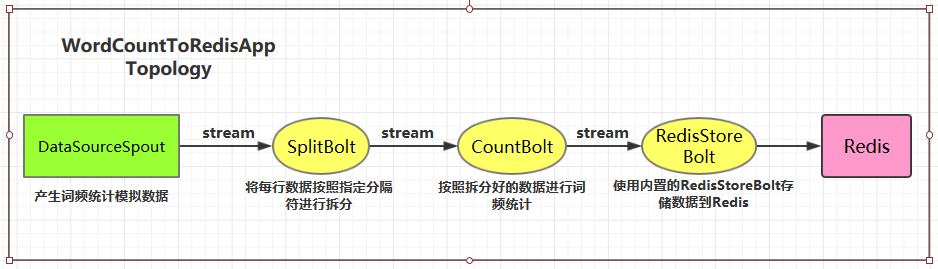
用例源码下载地址:storm-redis-integration
2.2 项目依赖
项目主要依赖如下:
1
2
3
4
5
6
7
8
9
10
11
12
13
14
15
<properties>
  <storm.version>1.2.2</storm.version>
</properties>
<dependencies>
  <dependency>
    <groupId>org.apache.storm</groupId>
    <artifactId>storm-core</artifactId>
    <version>${storm.version}</version>
  </dependency>
  <dependency>
    <groupId>org.apache.storm</groupId>
    <artifactId>storm-redis</artifactId>
    <version>${storm.version}</version>
  </dependency>
</dependencies>
2.3 DataSourceSpout
1
2
3
4
5
6
7
8
9
10
11
12
13
14
15
16
17
18
19
20
21
22
23
24
25
26
27
28
/** * 产生词频样本的数据源 */public class DataSourceSpout extends BaseRichSpout
{
    private List<String> list = Arrays.asList("Spark", "Hadoop", "HBase", "Storm", "Flink", "Hive") ;
    private SpoutOutputCollector spoutOutputCollector ;
    @Override public void open(Map map, TopologyContext topologyContext, SpoutOutputCollector spoutOutputCollector)
    {
        this.spoutOutputCollector = spoutOutputCollector ;
    }
    @Override public void nextTuple()
    {
        // 模拟产生数据 String lineData = productData() ;
        spoutOutputCollector.emit(new Values(lineData)) ;
        Utils.sleep(1000) ;
    }
    @Override public void declareOutputFields(OutputFieldsDeclarer outputFieldsDeclarer)
    {
        outputFieldsDeclarer.declare(new Fields("line")) ;
    }
    /** * 模拟数据 */ private String productData()
    {
        Collections.shuffle(list) ;
        Random random = new Random() ;
        int endIndex = random.nextInt(list.size()) % (list.size()) + 1 ;
        return StringUtils.join(list.toArray(), "\t", 0, endIndex) ;
    }
}
产生的模拟数据格式如下:
```plain text Spark HBase Hive Flink Storm Hadoop HBase Spark Flink HBase Storm HBase Hadoop Hive Flink HBase Flink Hive Storm Hive Flink Hadoop HBase Hive Hadoop Spark HBase Storm
1
2
3
4
5
6
7
8
9
10
11
12
13
14
15
16
17
18
19
20
21
22
23
24
25
26
27

### 2.4 SplitBolt

```java
/** * 将每行数据按照指定分隔符进行拆分 */public class SplitBolt extends BaseRichBolt
{
    private OutputCollector collector ;
    @Override public void prepare(Map stormConf, TopologyContext context, OutputCollector collector)
    {
        this.collector = collector ;
    }
    @Override public void execute(Tuple input)
    {
        String line = input.getStringByField("line") ;
        String[] words = line.split("\t") ;
        for (String word : words)
        {
            collector.emit(new Values(word, String.valueOf(1))) ;
        }
    }
    @Override public void declareOutputFields(OutputFieldsDeclarer declarer)
    {
        declarer.declare(new Fields("word", "count")) ;
    }
}
2.5 CountBolt
1
2
3
4
5
6
7
8
9
10
11
12
13
14
15
16
17
18
19
20
21
22
23
24
25
26
27
/** * 进行词频统计 */public class CountBolt extends BaseRichBolt
{
    private Map<String, Integer> counts = new HashMap<>() ;
    private OutputCollector collector ;
    @Override public void prepare(Map stormConf, TopologyContext context, OutputCollector collector)
    {
        this.collector=collector ;
    }
    @Override public void execute(Tuple input)
    {
        String word = input.getStringByField("word") ;
        Integer count = counts.get(word) ;
        if (count == null)
        {
            count = 0 ;
        }
        count++ ;
        counts.put(word, count) ;
        // 输出 collector.emit(new Values(word, String.valueOf(count))) ;
    }
    @Override public void declareOutputFields(OutputFieldsDeclarer declarer)
    {
        declarer.declare(new Fields("word", "count")) ;
    }
}
2.6 WordCountStoreMapper
实现 RedisStoreMapper 接口,定义 tuple 与 Redis 中数据的映射关系:即需要指定 tuple 中的哪个字段为 key,哪个字段为 value,并且存储到 Redis 的何种数据结构中。
1
2
3
4
5
6
7
8
9
10
11
12
13
14
15
16
17
18
19
20
21
22
23
/** * 定义 tuple 与 Redis 中数据的映射关系 */public class WordCountStoreMapper implements RedisStoreMapper
{
    private RedisDataTypeDescription description ;
    private final String hashKey = "wordCount" ;
    public WordCountStoreMapper()
    {
        description = new RedisDataTypeDescription( RedisDataTypeDescription.RedisDataType.HASH, hashKey) ;
    }
    @Override public RedisDataTypeDescription getDataTypeDescription()
    {
        return description ;
    }
    @Override public String getKeyFromTuple(ITuple tuple)
    {
        return tuple.getStringByField("word") ;
    }
    @Override public String getValueFromTuple(ITuple tuple)
    {
        return tuple.getStringByField("count") ;
    }
}
2.7 WordCountToRedisApp
1
2
3
4
5
6
7
8
9
10
11
12
13
14
15
16
17
18
19
20
21
22
23
24
25
26
27
28
29
30
31
32
33
34
35
36
37
38
/** * 进行词频统计 并将统计结果存储到 Redis 中 */public class WordCountToRedisApp
{
    private static final String DATA_SOURCE_SPOUT = "dataSourceSpout" ;
    private static final String SPLIT_BOLT = "splitBolt" ;
    private static final String COUNT_BOLT = "countBolt" ;
    private static final String STORE_BOLT = "storeBolt" ;
    //在实际开发中这些参数可以将通过外部传入 使得程序更加灵活 private static final String REDIS_HOST = "192.168.200.226" ;
    private static final int REDIS_PORT = 6379 ;
    public static void main(String[] args)
    {
        TopologyBuilder builder = new TopologyBuilder() ;
        builder.setSpout(DATA_SOURCE_SPOUT, new DataSourceSpout()) ;
        // split builder.setBolt(SPLIT_BOLT, new SplitBolt()).shuffleGrouping(DATA_SOURCE_SPOUT) ;
        // count builder.setBolt(COUNT_BOLT, new CountBolt()).shuffleGrouping(SPLIT_BOLT) ;
        // save to redis JedisPoolConfig poolConfig = new JedisPoolConfig.Builder() .setHost(REDIS_HOST).setPort(REDIS_PORT).build() ;
        RedisStoreMapper storeMapper = new WordCountStoreMapper() ;
        RedisStoreBolt storeBolt = new RedisStoreBolt(poolConfig, storeMapper) ;
        builder.setBolt(STORE_BOLT, storeBolt).shuffleGrouping(COUNT_BOLT) ;
        // 如果外部传参 cluster 则代表线上环境启动否则代表本地启动 if (args.length > 0 && args[0].equals("cluster"))
        {
            try
            {
                StormSubmitter.submitTopology("ClusterWordCountToRedisApp", new Config(), builder.createTopology()) ;
            }
            catch (AlreadyAliveException | InvalidTopologyException | AuthorizationException e)
            {
                e.printStackTrace() ;
            }
        }
        else
        {
            LocalCluster cluster = new LocalCluster() ;
            cluster.submitTopology("LocalWordCountToRedisApp", new Config(), builder.createTopology()) ;
        }
    }
}
2.8 启动测试
可以用直接使用本地模式运行,也可以打包后提交到服务器集群运行。本仓库提供的源码默认采用 maven-shade-plugin 进行打包,打包命令如下:
```plain text
mvn clean package -D maven.test.skip=true
1
2
3
4
5
6
7
8
9
10
11
12
13
14
15
16
17
18
19
20
21
22
23
24
25
26
27
28
29
30
31
32
33
34
35
36
37
38
39
40
41
42
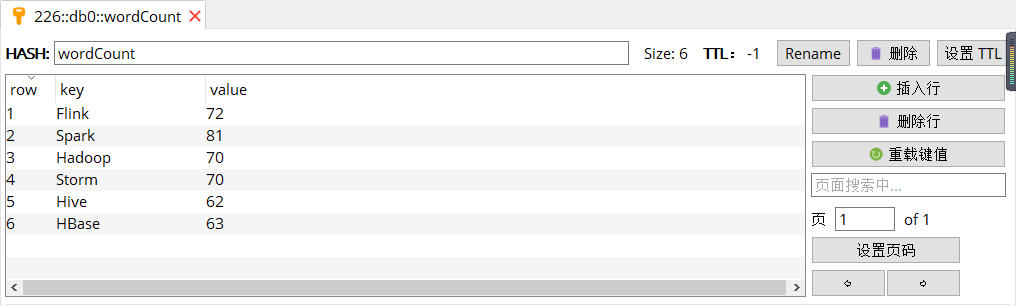
启动后,查看 Redis 中的数据:
## 三、storm-redis 实现原理
### 3.1 AbstractRedisBolt
RedisLookupBolt、RedisStoreBolt、RedisFilterBolt 均继承自 AbstractRedisBolt 抽象类,和我们自定义实现 Bolt 一样,AbstractRedisBolt 间接继承自 BaseRichBolt。
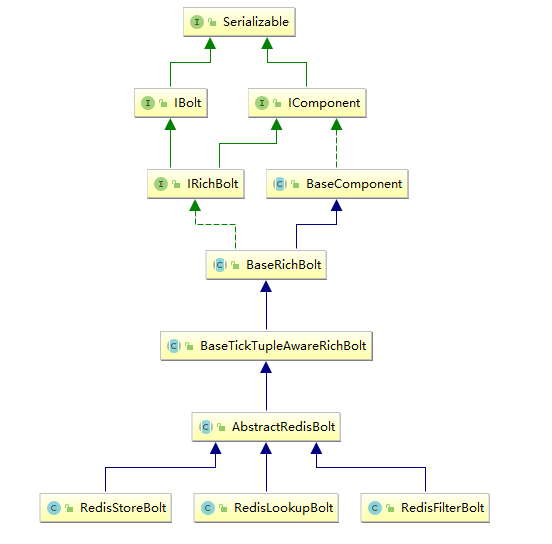
AbstractRedisBolt 中比较重要的是 prepare 方法,在该方法中通过外部传入的 jedis 连接池配置 ( jedisPoolConfig/jedisClusterConfig) 创建用于管理 Jedis 实例的容器 JedisCommandsInstanceContainer。
```java
public abstract class AbstractRedisBolt extends BaseTickTupleAwareRichBolt
{
protected OutputCollector collector ;
private transient JedisCommandsInstanceContainer container ;
private JedisPoolConfig jedisPoolConfig ;
private JedisClusterConfig jedisClusterConfig ;
...... @Override public void prepare(Map map, TopologyContext topologyContext, OutputCollector collector)
{
// FIXME: stores map (stormConf), topologyContext and expose these to derived classes this.collector = collector ;
if (jedisPoolConfig != null)
{
this.container = JedisCommandsContainerBuilder.build(jedisPoolConfig) ;
}
else if (jedisClusterConfig != null)
{
this.container = JedisCommandsContainerBuilder.build(jedisClusterConfig) ;
}
else
{
throw new IllegalArgumentException("Jedis configuration not found") ;
}
}
.......
}
JedisCommandsInstanceContainer 的 build() 方法如下,实际上就是创建 JedisPool 或 JedisCluster 并传入容器中。
1
2
3
4
5
6
7
8
9
10
public static JedisCommandsInstanceContainer build(JedisPoolConfig config)
{
    JedisPool jedisPool = new JedisPool(DEFAULT_POOL_CONFIG, config.getHost(), config.getPort(), config.getTimeout(), config.getPassword(), config.getDatabase()) ;
    return new JedisContainer(jedisPool) ;
}
public static JedisCommandsInstanceContainer build(JedisClusterConfig config)
{
    JedisCluster jedisCluster = new JedisCluster(config.getNodes(), config.getTimeout(), config.getTimeout(), config.getMaxRedirections(), config.getPassword(), DEFAULT_POOL_CONFIG) ;
    return new JedisClusterContainer(jedisCluster) ;
}
3.2 RedisStoreBolt和RedisLookupBolt
RedisStoreBolt 中比较重要的是 process 方法,该方法主要从 storeMapper 中获取传入 key/value 的值,并按照其存储类型 dataType 调用 jedisCommand 的对应方法进行存储。
RedisLookupBolt 的实现基本类似,从 lookupMapper 中获取传入的 key 值,并进行查询操作。
1
2
3
4
5
6
7
8
9
10
11
12
13
14
15
16
17
18
19
20
21
22
23
24
25
26
27
28
29
30
31
32
33
34
35
36
37
38
39
40
41
42
43
44
45
46
47
48
49
50
51
52
53
54
55
56
57
58
59
60
61
62
63
64
65
66
67
68
69
70
public class RedisStoreBolt extends AbstractRedisBolt
{
    private final RedisStoreMapper storeMapper ;
    private final RedisDataTypeDescription.RedisDataType dataType ;
    private final String additionalKey ;
    public RedisStoreBolt(JedisPoolConfig config, RedisStoreMapper storeMapper)
    {
        super(config) ;
        this.storeMapper = storeMapper ;
        RedisDataTypeDescription dataTypeDescription = storeMapper.getDataTypeDescription() ;
        this.dataType = dataTypeDescription.getDataType() ;
        this.additionalKey = dataTypeDescription.getAdditionalKey() ;
    }
    public RedisStoreBolt(JedisClusterConfig config, RedisStoreMapper storeMapper)
    {
        super(config) ;
        this.storeMapper = storeMapper ;
        RedisDataTypeDescription dataTypeDescription = storeMapper.getDataTypeDescription() ;
        this.dataType = dataTypeDescription.getDataType() ;
        this.additionalKey = dataTypeDescription.getAdditionalKey() ;
    }
    @Override public void process(Tuple input)
    {
        String key = storeMapper.getKeyFromTuple(input) ;
        String value = storeMapper.getValueFromTuple(input) ;
        JedisCommands jedisCommand = null ;
        try
        {
            jedisCommand = getInstance() ;
            switch (dataType)
            {
                case STRING: jedisCommand.set(key, value) ;
                break ;
                case LIST: jedisCommand.rpush(key, value) ;
                break ;
                case HASH: jedisCommand.hset(additionalKey, key, value) ;
                break ;
                case SET: jedisCommand.sadd(key, value) ;
                break ;
                case SORTED_SET: jedisCommand.zadd(additionalKey, Double.valueOf(value), key) ;
                break ;
                case HYPER_LOG_LOG: jedisCommand.pfadd(key, value) ;
                break ;
                case GEO: String[] array = value.split(":") ;
                if (array.length != 2)
                {
                    throw new IllegalArgumentException("value structure should be longitude:latitude") ;
                }
                double longitude = Double.valueOf(array[0]) ;
                double latitude = Double.valueOf(array[1]) ;
                jedisCommand.geoadd(additionalKey, longitude, latitude, key) ;
                break ;
                default: throw new IllegalArgumentException("Cannot process such data type: " + dataType) ;
            }
            collector.ack(input) ;
        }
        catch (Exception e)
        {
            this.collector.reportError(e) ;
            this.collector.fail(input) ;
        }
        finally
        {
            returnInstance(jedisCommand) ;
        }
    }
    .........
}
3.3 JedisCommands
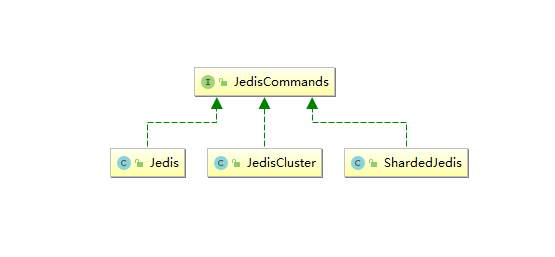
JedisCommands 接口中定义了所有的 Redis 客户端命令,它有以下三个实现类,分别是 Jedis、JedisCluster、ShardedJedis。Strom 中主要使用前两种实现类,具体调用哪一个实现类来执行命令,由传入的是 jedisPoolConfig 还是 jedisClusterConfig 来决定。
3.4 RedisMapper 和 TupleMapper
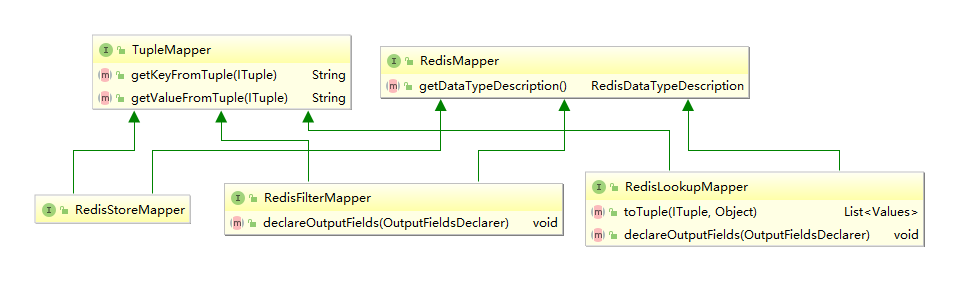
RedisMapper 和 TupleMapper 定义了 tuple 和 Redis 中的数据如何进行映射转换。
1. TupleMapper
TupleMapper 主要定义了两个方法:
- getKeyFromTuple(ITuple tuple): 从 tuple 中获取那个字段作为 Key;
- getValueFromTuple(ITuple tuple):从 tuple 中获取那个字段作为 Value;
2. RedisMapper
定义了获取数据类型的方法 getDataTypeDescription(),RedisDataTypeDescription 中 RedisDataType 枚举类定义了所有可用的 Redis 数据类型:
1
2
3
4
5
6
7
8
9
10
public class RedisDataTypeDescription implements Serializable
{
    public enum RedisDataType
    {
        STRING, HASH, LIST, SET, SORTED_SET, HYPER_LOG_LOG, GEO;
    }
    ......
}
3. RedisStoreMapper
RedisStoreMapper 继承 TupleMapper 和 RedisMapper 接口,用于数据存储时,没有定义额外方法。
4. RedisLookupMapper
RedisLookupMapper 继承 TupleMapper 和 RedisMapper 接口:
- 定义了 declareOutputFields 方法,声明输出的字段。
- 定义了 toTuple 方法,将查询结果组装为 Storm 的 Values 的集合,并用于发送。
下面的例子表示从输入 Tuple 的获取 word 字段作为 key,使用 RedisLookupBolt 进行查询后,将 key 和查询结果 value 组装为 values 并发送到下一个处理单元。
1
2
3
4
5
6
7
8
9
10
11
12
13
14
15
16
17
18
19
20
21
22
23
24
25
26
27
28
29
30
31
32
33
34
class WordCountRedisLookupMapper implements RedisLookupMapper
{
    private RedisDataTypeDescription description ;
    private final String hashKey = "wordCount" ;
    public WordCountRedisLookupMapper()
    {
        description = new RedisDataTypeDescription( RedisDataTypeDescription.RedisDataType.HASH, hashKey) ;
    }
    @Override public List<Values> toTuple(ITuple input, Object value)
    {
        String member = getKeyFromTuple(input) ;
        List<Values> values = Lists.newArrayList() ;
        values.add(new Values(member, value)) ;
        return values ;
    }
    @Override public void declareOutputFields(OutputFieldsDeclarer declarer)
    {
        declarer.declare(new Fields("wordName", "count")) ;
    }
    @Override public RedisDataTypeDescription getDataTypeDescription()
    {
        return description ;
    }
    @Override public String getKeyFromTuple(ITuple tuple)
    {
        return tuple.getStringByField("word") ;
    }
    @Override public String getValueFromTuple(ITuple tuple)
    {
        return null ;
    }
}
5. RedisFilterMapper
RedisFilterMapper 继承 TupleMapper 和 RedisMapper 接口,用于查询数据时,定义了 declareOutputFields 方法,声明输出的字段。如下面的实现:
1
2
3
4
@Overridepublic void declareOutputFields(OutputFieldsDeclarer declarer)
{
    declarer.declare(new Fields("wordName", "count")) ;
}
四、自定义RedisBolt实现词频统计
4.1 实现原理
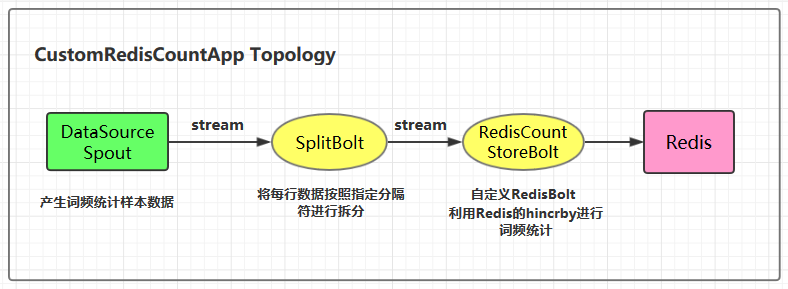
自定义 RedisBolt:主要利用 Redis 中哈希结构的 hincrby key field 命令进行词频统计。在 Redis 中 hincrby 的执行效果如下。hincrby 可以将字段按照指定的值进行递增,如果该字段不存在的话,还会新建该字段,并赋值为 0。通过这个命令可以非常轻松的实现词频统计功能。
```plain text redis> HSET myhash field 5 (integer) 1 redis> HINCRBY myhash field 1 (integer) 6 redis> HINCRBY myhash field -1 (integer) 5 redis> HINCRBY myhash field -10 (integer) -5 redis>
1
2
3
4
5
6
7
8
9
10
11
12
13
14
15
16
17
18
19
20
21
22
23
24
25
26
27
28
29
30
31
32
33
34
35
36
37
38
39
40
41
42
43
44
45
46
47
48
49
50
51
52
53
54
55
### 4.2 项目结构
### 4.3 自定义RedisBolt的代码实现
```java
/** * 自定义 RedisBolt 利用 Redis 的哈希数据结构的 hincrby key field 命令进行词频统计 */public class RedisCountStoreBolt extends AbstractRedisBolt
{
private final RedisStoreMapper storeMapper ;
private final RedisDataTypeDescription.RedisDataType dataType ;
private final String additionalKey ;
public RedisCountStoreBolt(JedisPoolConfig config, RedisStoreMapper storeMapper)
{
super(config) ;
this.storeMapper = storeMapper ;
RedisDataTypeDescription dataTypeDescription = storeMapper.getDataTypeDescription() ;
this.dataType = dataTypeDescription.getDataType() ;
this.additionalKey = dataTypeDescription.getAdditionalKey() ;
}
@Override protected void process(Tuple tuple)
{
String key = storeMapper.getKeyFromTuple(tuple) ;
String value = storeMapper.getValueFromTuple(tuple) ;
JedisCommands jedisCommand = null ;
try
{
jedisCommand = getInstance() ;
if (dataType == RedisDataTypeDescription.RedisDataType.HASH)
{
jedisCommand.hincrBy(additionalKey, key, Long.valueOf(value)) ;
}
else
{
throw new IllegalArgumentException("Cannot process such data type for Count: " + dataType) ;
}
collector.ack(tuple) ;
}
catch (Exception e)
{
this.collector.reportError(e) ;
this.collector.fail(tuple) ;
}
finally
{
returnInstance(jedisCommand) ;
}
}
@Override public void declareOutputFields(OutputFieldsDeclarer declarer)
{
}
}
4.4 CustomRedisCountApp
1
2
3
4
5
6
7
8
9
10
11
12
13
14
15
16
17
18
19
20
21
22
23
24
25
26
27
28
29
30
31
32
33
34
35
36
/** * 利用自定义的 RedisBolt 实现词频统计 */public class CustomRedisCountApp
{
    private static final String DATA_SOURCE_SPOUT = "dataSourceSpout" ;
    private static final String SPLIT_BOLT = "splitBolt" ;
    private static final String STORE_BOLT = "storeBolt" ;
    private static final String REDIS_HOST = "192.168.200.226" ;
    private static final int REDIS_PORT = 6379 ;
    public static void main(String[] args)
    {
        TopologyBuilder builder = new TopologyBuilder() ;
        builder.setSpout(DATA_SOURCE_SPOUT, new DataSourceSpout()) ;
        // split builder.setBolt(SPLIT_BOLT, new SplitBolt()).shuffleGrouping(DATA_SOURCE_SPOUT) ;
        // save to redis and count JedisPoolConfig poolConfig = new JedisPoolConfig.Builder() .setHost(REDIS_HOST).setPort(REDIS_PORT).build() ;
        RedisStoreMapper storeMapper = new WordCountStoreMapper() ;
        RedisCountStoreBolt countStoreBolt = new RedisCountStoreBolt(poolConfig, storeMapper) ;
        builder.setBolt(STORE_BOLT, countStoreBolt).shuffleGrouping(SPLIT_BOLT) ;
        // 如果外部传参 cluster 则代表线上环境启动,否则代表本地启动 if (args.length > 0 && args[0].equals("cluster"))
        {
            try
            {
                StormSubmitter.submitTopology("ClusterCustomRedisCountApp", new Config(), builder.createTopology()) ;
            }
            catch (AlreadyAliveException | InvalidTopologyException | AuthorizationException e)
            {
                e.printStackTrace() ;
            }
        }
        else
        {
            LocalCluster cluster = new LocalCluster() ;
            cluster.submitTopology("LocalCustomRedisCountApp", new Config(), builder.createTopology()) ;
        }
    }
}