Storm 集成 HDFS 和 HBase
一、Storm集成HDFS
1.1 项目结构
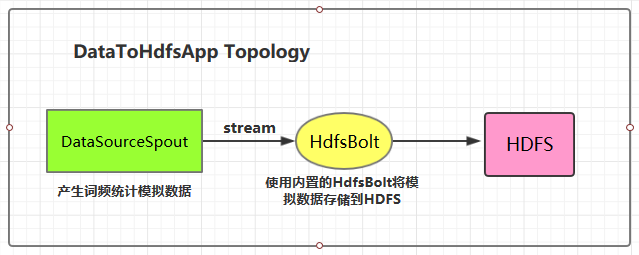
本用例源码下载地址:storm-hdfs-integration
1.2 项目主要依赖
项目主要依赖如下,有两个地方需要注意:
- 这里由于我服务器上安装的是 CDH 版本的 Hadoop,在导入依赖时引入的也是 CDH 版本的依赖,需要使用 标签指定 CDH 的仓库地址;
- hadoop-common 、 hadoop-client 、 hadoop-hdfs 均需要排除 slf4j-log4j12 依赖,原因是 storm-core 中已经有该依赖,不排除的话有 JAR 包冲突的风险;
1
2
3
4
5
6
7
8
9
10
11
12
13
14
15
16
17
18
19
20
21
22
23
24
25
26
27
28
29
30
31
32
33
34
35
36
37
38
39
40
41
42
43
44
45
46
47
48
49
50
51
52
53
54
<properties>
  <storm.version>1.2.2</storm.version>
</properties>
<repositories>
  <repository>
    <id>cloudera</id>
    <url>https://repository.cloudera.com/artifactory/cloudera-repos/</url>
  </repository>
</repositories>
<dependencies>
  <dependency>
    <groupId>org.apache.storm</groupId>
    <artifactId>storm-core</artifactId>
    <version>${storm.version}</version>
  </dependency>
  <!--Storm 整合 HDFS 依赖-->  <dependency>
    <groupId>org.apache.storm</groupId>
    <artifactId>storm-hdfs</artifactId>
    <version>${storm.version}</version>
  </dependency>
  <dependency>
    <groupId>org.apache.hadoop</groupId>
    <artifactId>hadoop-common</artifactId>
    <version>2.6.0-cdh5.15.2</version>
    <exclusions>
      <exclusion>
        <groupId>org.slf4j</groupId>
        <artifactId>slf4j-log4j12</artifactId>
      </exclusion>
    </exclusions>
  </dependency>
  <dependency>
    <groupId>org.apache.hadoop</groupId>
    <artifactId>hadoop-client</artifactId>
    <version>2.6.0-cdh5.15.2</version>
    <exclusions>
      <exclusion>
        <groupId>org.slf4j</groupId>
        <artifactId>slf4j-log4j12</artifactId>
      </exclusion>
    </exclusions>
  </dependency>
  <dependency>
    <groupId>org.apache.hadoop</groupId>
    <artifactId>hadoop-hdfs</artifactId>
    <version>2.6.0-cdh5.15.2</version>
    <exclusions>
      <exclusion>
        <groupId>org.slf4j</groupId>
        <artifactId>slf4j-log4j12</artifactId>
      </exclusion>
    </exclusions>
  </dependency>
</dependencies>
1.3 DataSourceSpout
1
/** * 产生词频样本的数据源 */public class DataSourceSpout extends BaseRichSpout {    private List<String> list = Arrays.asList("Spark", "Hadoop", "HBase", "Storm", "Flink", "Hive");    private SpoutOutputCollector spoutOutputCollector;    @Override    public void open(Map map, TopologyContext topologyContext, SpoutOutputCollector spoutOutputCollector) {        this.spoutOutputCollector = spoutOutputCollector;    }    @Override    public void nextTuple() {        // 模拟产生数据        String lineData = productData();        spoutOutputCollector.emit(new Values(lineData));        Utils.sleep(1000);    }    @Override    public void declareOutputFields(OutputFieldsDeclarer outputFieldsDeclarer) {        outputFieldsDeclarer.declare(new Fields("line"));    }    /**     * 模拟数据     */    private String productData() {        Collections.shuffle(list);        Random random = new Random();        int endIndex = random.nextInt(list.size()) % (list.size()) + 1;        return StringUtils.join(list.toArray(), "\t", 0, endIndex);    }}
产生的模拟数据格式如下:
```plain text Spark HBase Hive Flink Storm Hadoop HBase Spark Flink HBase Storm HBase Hadoop Hive Flink HBase Flink Hive Storm Hive Flink Hadoop HBase Hive Hadoop Spark HBase Storm
1
2
3
4
5
6
7

### 1.4 将数据存储到HDFS

这里 HDFS 的地址和数据存储路径均使用了硬编码,在实际开发中可以通过外部传参指定,这样程序更为灵活。

```java
public class DataToHdfsApp {    private static final String DATA_SOURCE_SPOUT = "dataSourceSpout";    private static final String HDFS_BOLT = "hdfsBolt";    public static void main(String[] args) {        // 指定 Hadoop 的用户名 如果不指定,则在 HDFS 创建目录时候有可能抛出无权限的异常 (RemoteException: Permission denied)        System.setProperty("HADOOP_USER_NAME", "root");        // 定义输出字段 (Field) 之间的分隔符        RecordFormat format = new DelimitedRecordFormat()        .withFieldDelimiter("|");        // 同步策略: 每 100 个 tuples 之后就会把数据从缓存刷新到 HDFS 中        SyncPolicy syncPolicy = new CountSyncPolicy(100);        // 文件策略: 每个文件大小上限 1M,超过限定时,创建新文件并继续写入        FileRotationPolicy rotationPolicy = new FileSizeRotationPolicy(1.0f, Units.MB);        // 定义存储路径        FileNameFormat fileNameFormat = new DefaultFileNameFormat()        .withPath("/storm-hdfs/");        // 定义 HdfsBolt        HdfsBolt hdfsBolt = new HdfsBolt()        .withFsUrl("hdfs://hadoop001:8020")        .withFileNameFormat(fileNameFormat)        .withRecordFormat(format)        .withRotationPolicy(rotationPolicy)        .withSyncPolicy(syncPolicy);        // 构建 Topology        TopologyBuilder builder = new TopologyBuilder();        builder.setSpout(DATA_SOURCE_SPOUT, new DataSourceSpout());        // save to HDFS        builder.setBolt(HDFS_BOLT, hdfsBolt, 1).shuffleGrouping(DATA_SOURCE_SPOUT);        // 如果外部传参 cluster 则代表线上环境启动,否则代表本地启动        if (args.length > 0 && args[0].equals("cluster")) {            try {                StormSubmitter.submitTopology("ClusterDataToHdfsApp", new Config(), builder.createTopology());            } catch (AlreadyAliveException | InvalidTopologyException | AuthorizationException e) {                e.printStackTrace();            }        } else {            LocalCluster cluster = new LocalCluster();            cluster.submitTopology("LocalDataToHdfsApp",                                   new Config(), builder.createTopology());        }    }}
1.5 启动测试
可以用直接使用本地模式运行,也可以打包后提交到服务器集群运行。本仓库提供的源码默认采用 maven-shade-plugin 进行打包,打包命令如下:
```plain text
mvn clean package -D maven.test.skip=true
1
2
3
4
5
6
7
8

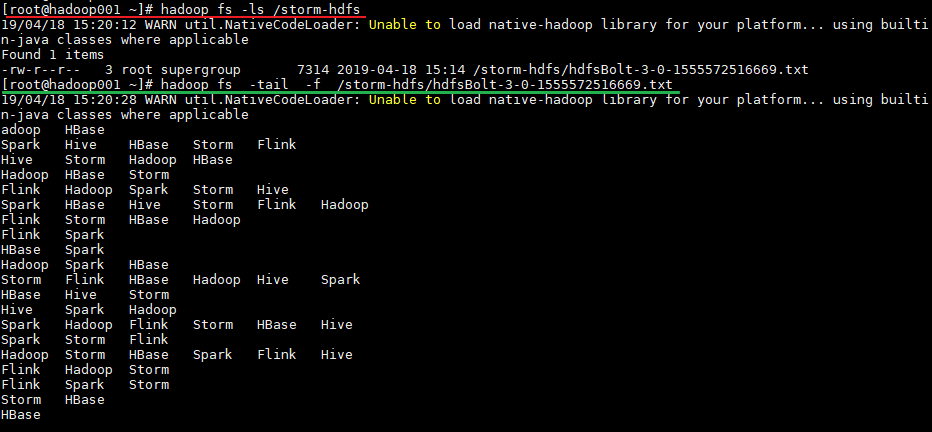
运行后,数据会存储到 HDFS 的 /storm-hdfs 目录下。使用以下命令可以查看目录内容:

```plain text
# 查看目录内容
hadoop fs -ls /storm-hdfs
# 监听文内容变化
hadoop fs -tail -f /strom-hdfs/文件名
二、Storm集成HBase
2.1 项目结构
集成用例: 进行词频统计并将最后的结果存储到 HBase,项目主要结构如下:
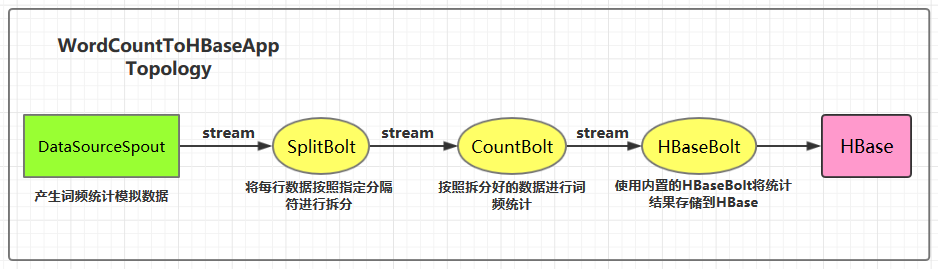
本用例源码下载地址:storm-hbase-integration
2.2 项目主要依赖
1
2
3
4
5
6
7
8
9
10
11
12
13
14
15
<properties>
  <storm.version>1.2.2</storm.version>
</properties>
<dependencies>
  <dependency>
    <groupId>org.apache.storm</groupId>
    <artifactId>storm-core</artifactId>
    <version>${storm.version}</version>
  </dependency>
  <!--Storm 整合 HBase 依赖-->  <dependency>
    <groupId>org.apache.storm</groupId>
    <artifactId>storm-hbase</artifactId>
    <version>${storm.version}</version>
  </dependency>
</dependencies>
2.3 DataSourceSpout
1
/** * 产生词频样本的数据源 */public class DataSourceSpout extends BaseRichSpout {    private List<String> list = Arrays.asList("Spark", "Hadoop", "HBase", "Storm", "Flink", "Hive");    private SpoutOutputCollector spoutOutputCollector;    @Override    public void open(Map map, TopologyContext topologyContext, SpoutOutputCollector spoutOutputCollector) {        this.spoutOutputCollector = spoutOutputCollector;    }    @Override    public void nextTuple() {        // 模拟产生数据        String lineData = productData();        spoutOutputCollector.emit(new Values(lineData));        Utils.sleep(1000);    }    @Override    public void declareOutputFields(OutputFieldsDeclarer outputFieldsDeclarer) {        outputFieldsDeclarer.declare(new Fields("line"));    }    /**     * 模拟数据     */    private String productData() {        Collections.shuffle(list);        Random random = new Random();        int endIndex = random.nextInt(list.size()) % (list.size()) + 1;        return StringUtils.join(list.toArray(), "\t", 0, endIndex);    }}
产生的模拟数据格式如下:
```plain text Spark HBase Hive Flink Storm Hadoop HBase Spark Flink HBase Storm HBase Hadoop Hive Flink HBase Flink Hive Storm Hive Flink Hadoop HBase Hive Hadoop Spark HBase Storm
1
2
3
4
5

### 2.4 SplitBolt

```java
/** * 将每行数据按照指定分隔符进行拆分 */public class SplitBolt extends BaseRichBolt {    private OutputCollector collector;    @Override    public void prepare(Map stormConf, TopologyContext context, OutputCollector collector) {        this.collector = collector;    }    @Override    public void execute(Tuple input) {        String line = input.getStringByField("line");        String[] words = line.split("\t");        for (String word : words) {            collector.emit(tuple(word, 1));        }    }    @Override    public void declareOutputFields(OutputFieldsDeclarer declarer) {        declarer.declare(new Fields("word", "count"));    }}
2.5 CountBolt
1
/** * 进行词频统计 */public class CountBolt extends BaseRichBolt {    private Map<String, Integer> counts = new HashMap<>();    private OutputCollector collector;    @Override    public void prepare(Map stormConf, TopologyContext context, OutputCollector collector) {        this.collector=collector;    }    @Override    public void execute(Tuple input) {        String word = input.getStringByField("word");        Integer count = counts.get(word);        if (count == null) {            count = 0;        }        count++;        counts.put(word, count);        // 输出        collector.emit(new Values(word, String.valueOf(count)));    }    @Override    public void declareOutputFields(OutputFieldsDeclarer declarer) {        declarer.declare(new Fields("word", "count"));    }}
2.6 WordCountToHBaseApp
1
/** * 进行词频统计 并将统计结果存储到 HBase 中 */public class WordCountToHBaseApp {    private static final String DATA_SOURCE_SPOUT = "dataSourceSpout";    private static final String SPLIT_BOLT = "splitBolt";    private static final String COUNT_BOLT = "countBolt";    private static final String HBASE_BOLT = "hbaseBolt";    public static void main(String[] args) {        // storm 的配置        Config config = new Config();        // HBase 的配置        Map<String, Object> hbConf = new HashMap<>();        hbConf.put("hbase.rootdir", "hdfs://hadoop001:8020/hbase");        hbConf.put("hbase.zookeeper.quorum", "hadoop001:2181");        // 将 HBase 的配置传入 Storm 的配置中        config.put("hbase.conf", hbConf);        // 定义流数据与 HBase 中数据的映射        SimpleHBaseMapper mapper = new SimpleHBaseMapper()        .withRowKeyField("word")        .withColumnFields(new Fields("word","count"))        .withColumnFamily("info");        /*         * 给 HBaseBolt 传入表名、数据映射关系、和 HBase 的配置信息         * 表需要预先创建: create 'WordCount','info'         */        HBaseBolt hbase = new HBaseBolt("WordCount", mapper)        .withConfigKey("hbase.conf");        // 构建 Topology        TopologyBuilder builder = new TopologyBuilder();        builder.setSpout(DATA_SOURCE_SPOUT, new DataSourceSpout(),1);        // split        builder.setBolt(SPLIT_BOLT, new SplitBolt(), 1).shuffleGrouping(DATA_SOURCE_SPOUT);        // count        builder.setBolt(COUNT_BOLT, new CountBolt(),1).shuffleGrouping(SPLIT_BOLT);        // save to HBase        builder.setBolt(HBASE_BOLT, hbase, 1).shuffleGrouping(COUNT_BOLT);        // 如果外部传参 cluster 则代表线上环境启动,否则代表本地启动        if (args.length > 0 && args[0].equals("cluster")) {            try {                StormSubmitter.submitTopology("ClusterWordCountToRedisApp", config, builder.createTopology());            } catch (AlreadyAliveException | InvalidTopologyException | AuthorizationException e) {                e.printStackTrace();            }        } else {            LocalCluster cluster = new LocalCluster();            cluster.submitTopology("LocalWordCountToRedisApp",                                   config, builder.createTopology());        }    }}
2.7 启动测试
可以用直接使用本地模式运行,也可以打包后提交到服务器集群运行。本仓库提供的源码默认采用 maven-shade-plugin 进行打包,打包命令如下:
```plain text
mvn clean package -D maven.test.skip=true
1
2
3
4
5

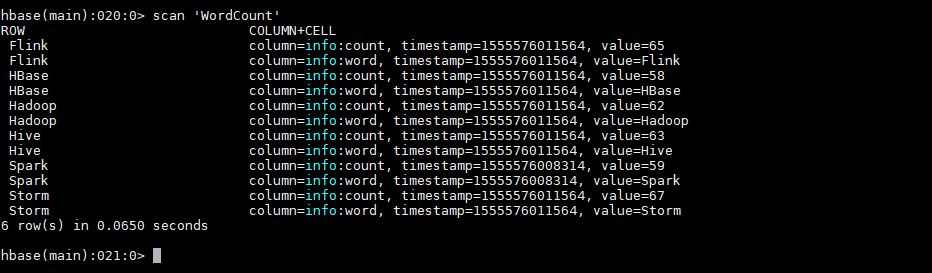
运行后,数据会存储到 HBase 的 WordCount 表中。使用以下命令查看表的内容:

```plain text
hbase >  scan 'WordCount'
2.8 withCounterFields
在上面的用例中我们是手动编码来实现词频统计,并将最后的结果存储到 HBase 中。其实也可以在构建 SimpleHBaseMapper 的时候通过 withCounterFields 指定 count 字段,被指定的字段会自动进行累加操作,这样也可以实现词频统计。需要注意的是 withCounterFields 指定的字段必须是 Long 类型,不能是 String 类型。
1
2
SimpleHBaseMapper mapper = new SimpleHBaseMapper()
.withRowKeyField("word").withColumnFields(new Fields("word")).withCounterFields(new Fields("count")).withColumnFamily("cf");