IOC-PropertyPlaceholderConfigurer的应用
本文主要基于 Spring 5.0.6.RELEASE
摘要: 原创出处 http://cmsblogs.com/?p=todo 「小明哥」,谢谢!
作为「小明哥」的忠实读者,「老艿艿」略作修改,记录在理解过程中,参考的资料。
在博客 《【死磕 Spring】—— IoC 之深入分析 PropertyPlaceholderConfigurer》 中了解了 PropertyPlaceholderConfigurer 内部实现原理,它允许我们在 XML 配置文件中使用占位符并将这些占位符所代表的资源单独配置到简单的 properties 文件中来加载。这个特性非常重要,因为它我们对 Bean 实例属性的配置变得非常容易控制了,主要使用场景有:
- 动态加载配置文件,多环境切换
- 属性加解密
下面我们就第一个应用场景来做说明。
1. 多环境切换
在我们项目开发过程中,都会存在多个环境,如 dev 、test 、prod 等等,各个环境的配置都会不一样,在传统的开发过程中我们都是在进行打包的时候进行人工干预,或者将配置文件放在系统外部,加载的时候指定加载目录,这种方式容易出错,那么有没有一种比较好的方式来解决这种情况呢?有,利用 PropertyPlaceholderConfigurer 的特性来动态加载配置文件,实现多环境切换。
首先我们定义四个 Properties 文件,如下:
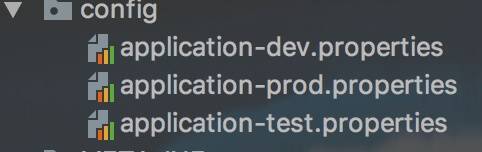
配置内容如下:
- application-dev.properties 文件,如下:
```plain text plain student.name=chenssy-dev
1
2
3
4
5
6
7
8

---

- application-test.properties
文件,如下:

```plain text
plain student.name=chenssy-test
- application-prod.properties 文件,如下:
```plain text plain student.name=chenssy-prod
1
2
3
4
5
6
7

---

然后实现一个类,该类继承 PropertyPlaceholderConfigurer,实现 #loadProperties(Properties props) 方法,根据环境的不同加载不同的配置文件,代码如下:

```plain text
java public class CustomPropertyConfig extends PropertyPlaceholderConfigurer {      private Resource[] locations;      private PropertiesPersister propertiesPersister = new DefaultPropertiesPersister();      @Override     public void setLocations(Resource[] locations) {         this.locations = locations;     }      @Override     public void setLocalOverride(boolean localOverride) {         this.localOverride = localOverride;     }      /**      * 覆盖这个方法,根据启动参数,动态读取配置文件      * @param props      * @throws IOException      */     @Override     protected void loadProperties(Properties props) throws IOException {         if (locations != null) {             // locations 里面就已经包含了那三个定义的文件             for (Resource location : this.locations) {                 InputStream is = null;                 try {                     String filename = location.getFilename();                     String env = "application-" + System.getProperty("spring.profiles.active", "dev") + ".properties";                      // 找到我们需要的文件,加载                     if (filename.contains(env)) {                         logger.info("Loading properties file from " + location);                         is = location.getInputStream();                         this.propertiesPersister.load(props, is);                      }                 } catch (IOException ex) {                     logger.info("读取配置文件失败.....");                     throw ex;                 } finally {                     if (is != null) {                         is.close();                     }                 }             }         }     } }
配置文件:
```plain text xml
1
2
3
4
5
6
7

---

在 idea 的 VM options 里面增加 -Dspring.profiles.active=dev,标志当前环境为 dev 环境。测试代码如下:

```plain text
java ApplicationContext context = new ClassPathXmlApplicationContext("spring.xml");  StudentService studentService = (StudentService) context.getBean("studentService"); System.out.println("student name:" + studentService.getName());
运行结果:
plain text plain student name:chenssy-dev
当将 -Dspring.profiles.active 调整为 test,则打印结果则是 chenssy-test,这样就完全实现了根据不同的环境加载不同的配置。
如果各位用过 Spring Boot 的话,这个就完全是 Spring Boot 里面的 spring.profiles.active ,可参见 org.springframework.core.envAbstractEnvironment 类,对应博客为 《Spring boot源码分析-profiles环境(4)》 。
2. 小结
PropertyPlaceholderConfigurer 对于属性的配置非常灵活,就看怎么玩了。