IOC-深入分析PropertyPlaceholderConfigurer
本文主要基于 Spring 5.0.6.RELEASE
摘要: 原创出处 http://cmsblogs.com/?p=todo 「小明哥」,谢谢!
作为「小明哥」的忠实读者,「老艿艿」略作修改,记录在理解过程中,参考的资料。
在上文 《【死磕 Spring】—— IoC 之深入分析 BeanFactoryPostProcessor》 中,介绍了 BeanFactoryPostProcessor,知道 BeanFactoryPostProcessor 作用域容器启动阶段,可以对解析好的 BeanDefinition 进行定制化处理,而其中 PropertyPlaceholderConfigurer 是其一个非常重要的应用,也是其子类,介绍如下:
PropertyPlaceholderConfigurer 允许我们用 Properties 文件中的属性,来定义应用上下文(配置文件或者注解)。
什么意思,就是说我们在 XML 配置文件(或者其他方式,如注解方式)中使用占位符的方式来定义一些资源,并将这些占位符所代表的资源配置到 Properties 中,这样只需要对 Properties 文件进行修改即可,这个特性非常,在后面来介绍一种我们在项目中经常用到场景。
1. PropertyResourceConfigurer
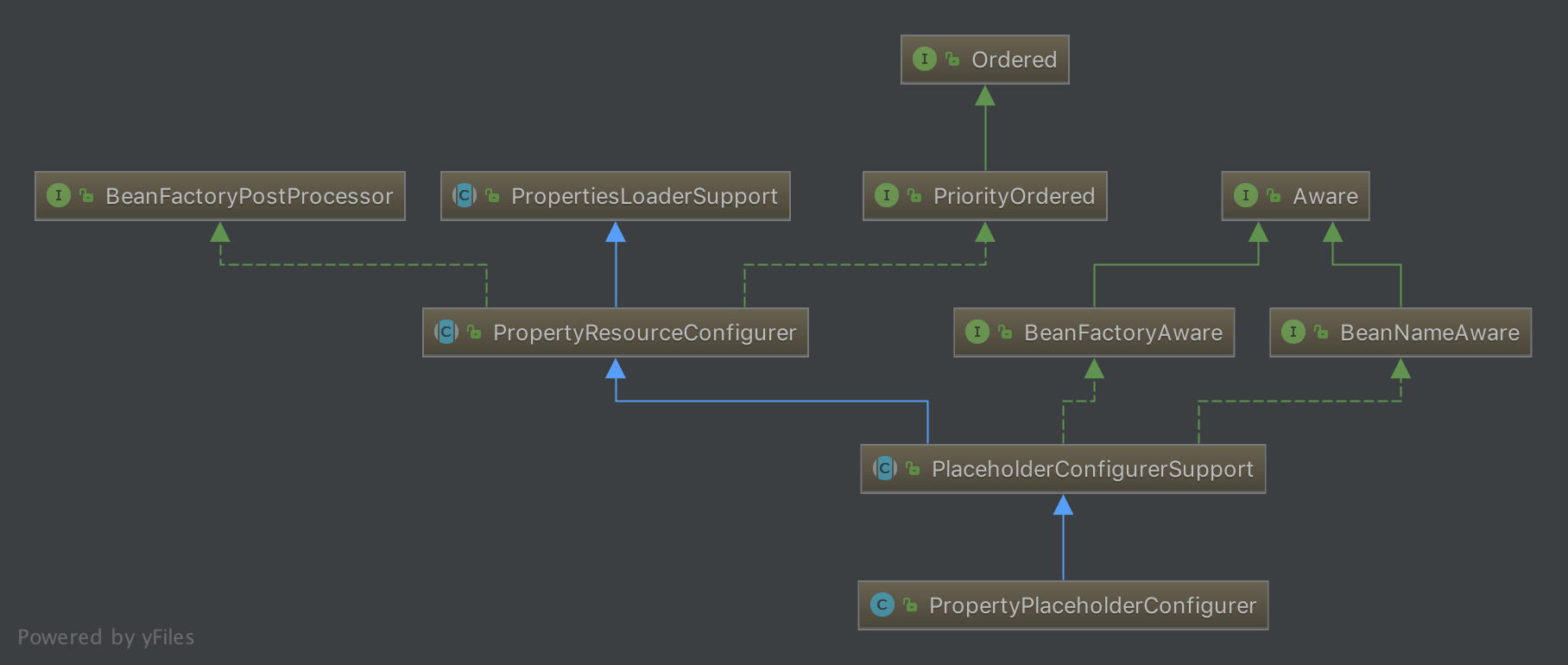
201809161001
从 PropertyPlaceholderConfigurer 的结构图可以看出,它间接实现了 Aware 和 BeanFactoryPostProcessor 两大扩展接口,这里只需要关注 BeanFactoryPostProcessor 即可。我们知道 BeanFactoryPostProcessor 提供了 #postProcessBeanFactory(ConfigurableListableBeanFactory beanFactory) 接口方法,在这个体系中该方法的是在 PropertyResourceConfigurer 中实现,该类为属性资源的配置类,它实现了 BeanFactoryPostProcessor 接口,代码如下:
```plain text java // PropertyResourceConfigurer.java // extends PropertiesLoaderSupport // implements BeanFactoryPostProcessor, PriorityOrdered @Override public void postProcessBeanFactory(ConfigurableListableBeanFactory beanFactory) throws BeansException { try { // <1> 返回合并的 Properties 实例 Properties mergedProps = mergeProperties(); // Convert the merged properties, if necessary. // <2> 转换合并属性 convertProperties(mergedProps); // Let the subclass process the properties. // <3> 子类处理 processProperties(beanFactory, mergedProps); } catch (IOException ex) { throw new BeanInitializationException(“Could not load properties”, ex); } }
1
2
3
4
5
6
7
8
9
10
11
12
13
14
15
16
17
18
19
20
21

---

- <1>**一组**
处,调用
#mergeProperties()
方法,返回合并的 Properties 实例。Properties 实例维护这
key-value
,其实就是 Properties 配置文件中的内容。
- <2>
处,调用
#convertProperties(Properties props)
方法,转换合并的值,其实就是将原始值替换为真正的值。
- <3>**由子类实现**
处,调用
#processProperties(ConfigurableListableBeanFactory beanFactory, Properties props)
方法,前面两个步骤已经将配置文件中的值进行了处理,那么该方法就是真正的替换过程,该方法
。代码如下:

```plain text
java // PropertyResourceConfigurer.java  protected abstract void processProperties(ConfigurableListableBeanFactory beanFactory, Properties props) throws BeansException;
2. PropertyPlaceholderConfigurer
在 PropertyPlaceholderConfigurer 中,重写 #processProperties(ConfigurableListableBeanFactory beanFactory, Properties props) 方法,代码如下:
```plain text java // PropertyPlaceholderConfigurer.java @Override protected void processProperties(ConfigurableListableBeanFactory beanFactoryToProcess, Properties props) throws BeansException { // <1> 创建 StringValueResolver 对象 StringValueResolver valueResolver = new PlaceholderResolvingStringValueResolver(props); // <2> 处理 doProcessProperties(beanFactoryToProcess, valueResolver); }
1
2
3
4
5
6
7
8
9
10
11

---

## 2.1 PlaceholderResolvingStringValueResolver

对应 #processProperties(ConfigurableListableBeanFactory beanFactoryToProcess, Properties props) 方法的 <1> 处。

首先,构造一个 PlaceholderResolvingStringValueResolver 类型的 StringValueResolver 实例。StringValueResolver 为一个解析 String 类型值的策略接口,该接口提供了 #resolveStringValue(String strVal) 方法,用于解析 String 值。PlaceholderResolvingStringValueResolver 为其一个解析策略,构造方法如下:

```plain text
java // PropertyPlaceholderConfigurer.java  private class PlaceholderResolvingStringValueResolver implements StringValueResolver {      private final PropertyPlaceholderHelper helper;      private final PlaceholderResolver resolver;      public PlaceholderResolvingStringValueResolver(Properties props) {         this.helper = new PropertyPlaceholderHelper(             placeholderPrefix, placeholderSuffix, valueSeparator, ignoreUnresolvablePlaceholders);         this.resolver = new PropertyPlaceholderConfigurerResolver(props);     }      // ... 省略 resolveStringValue 方法 }
- 在构造 String 值解析器 StringValueResolver 时,将已经解析的 Properties 实例对象封装在 PlaceholderResolver 实例 resolver 中。PlaceholderResolver 是一个用于解析字符串中包含占位符的替换值的策略接口,该接口有一个 #resolvePlaceholder(String strVa) 方法,用于返回占位符的替换值。
- 还有一个 PropertyPlaceholderHelper 工具 helper ,从名字上面看应该是进行替换的工具类。
2.2 doProcessProperties
对应 #processProperties(ConfigurableListableBeanFactory beanFactoryToProcess, Properties props) 方法的 <2> 处。
然后,得到 String 解析器的实例 valueResolver 后,则会调用 #doProcessProperties(ConfigurableListableBeanFactory beanFactoryToProcess, StringValueResolver valueResolver) 方法,来进行真值的替换操作。该方法在父类 PlaceholderConfigurerSupport 中实现,代码如下:
```plain text java // PlaceholderConfigurerSupport.java protected void doProcessProperties(ConfigurableListableBeanFactory beanFactoryToProcess, StringValueResolver valueResolver) { // <2.1> 创建 BeanDefinitionVisitor 对象 BeanDefinitionVisitor visitor = new BeanDefinitionVisitor(valueResolver); String[] beanNames = beanFactoryToProcess.getBeanDefinitionNames(); for (String curName : beanNames) { // 校验 // Check that we’re not parsing our own bean definition, // to avoid failing on unresolvable placeholders in properties file locations. if (!(curName.equals(this.beanName) // 1. 当前实例 PlaceholderConfigurerSupport 不在解析范围内 && beanFactoryToProcess.equals(this.beanFactory))) { // 2. 同一个 Spring 容器 BeanDefinition bd = beanFactoryToProcess.getBeanDefinition(curName); try { visitor.visitBeanDefinition(bd); } catch (Exception ex) { throw new BeanDefinitionStoreException(bd.getResourceDescription(), curName, ex.getMessage(), ex); } } } // New in Spring 2.5: resolve placeholders in alias target names and aliases as well. // <2.3> 别名的占位符 beanFactoryToProcess.resolveAliases(valueResolver); // New in Spring 3.0: resolve placeholders in embedded values such as annotation attributes. // <2.4> 解析嵌入值的占位符,例如注释属性 beanFactoryToProcess.addEmbeddedValueResolver(valueResolver); }
1
2
3
4
5
6
7
8
9
10
11
12
13
14
15
16
17
18
19
20
21
22

---

- <2.1
> 处,根据 String 值解析策略
valueResolver
得到 BeanDefinitionVisitor 实例。BeanDefinitionVisitor 是 BeanDefinition 的访问者,我们通过它可以实现对 BeanDefinition 内容的进行访问,内容很多,例如 Scope、PropertyValues、FactoryMethodName 等等。
- <2.2
> 处,得到该容器的所有 BeanName,然后对其进行访问(
#visitBeanDefinition(BeanDefinition beanDefinition)
方法)。
- <2.3
> 处,解析别名的占位符。
- <2.4
> 处,解析嵌入值的占位符,例如注释属性。

### 2.2.1 visitBeanDefinition

这个方法的**核心**在于 #visitBeanDefinition(BeanDefinition beanDefinition) 方法的调用,代码如下:

```plain text
java // BeanDefinitionVisitor.java  public void visitBeanDefinition(BeanDefinition beanDefinition) {     visitParentName(beanDefinition);     visitBeanClassName(beanDefinition);     visitFactoryBeanName(beanDefinition);     visitFactoryMethodName(beanDefinition);     visitScope(beanDefinition);     if (beanDefinition.hasPropertyValues()) {         visitPropertyValues(beanDefinition.getPropertyValues());     }     if (beanDefinition.hasConstructorArgumentValues()) {         ConstructorArgumentValues cas = beanDefinition.getConstructorArgumentValues();         visitIndexedArgumentValues(cas.getIndexedArgumentValues());         visitGenericArgumentValues(cas.getGenericArgumentValues());     } }
- 我们可以看到该方法基本访问了 BeanDefinition 中所有值得访问的东西了,包括 parent 、class 、factory-bean 、factory-method 、scope 、property 、constructor-arg 。
2.2.2 visitPropertyValues
本篇文章的主题是 property ,所以关注 #visitPropertyValues(MutablePropertyValues pvs) 方法即可。代码如下:
```plain text java // BeanDefinitionVisitor.java protected void visitPropertyValues(MutablePropertyValues pvs) { PropertyValue[] pvArray = pvs.getPropertyValues(); // 遍历 PropertyValue 数组 for (PropertyValue pv : pvArray) { // 解析真值 Object newVal = resolveValue(pv.getValue()); if (!ObjectUtils.nullSafeEquals(newVal, pv.getValue())) { // 设置到 PropertyValue 中 pvs.add(pv.getName(), newVal); } } }
1
2
3
4
5
6
7
8
9
10
11
12
13

---

- 过程就是对属性数组进行遍历,调用
#resolveValue(Object value)
方法,对属性进行解析获取最新值,如果新值和旧值不等,则用新值替换旧值。

### 2.2.2.1 resolveValue

#resolveValue(Object value) 方法,代码如下:

```plain text
java // BeanDefinitionVisitor.java  @Nullable protected Object resolveValue(@Nullable Object value) {     if (value instanceof BeanDefinition) {         visitBeanDefinition((BeanDefinition) value);     } else if (value instanceof BeanDefinitionHolder) {         visitBeanDefinition(((BeanDefinitionHolder) value).getBeanDefinition());     } else if (value instanceof RuntimeBeanReference) {         RuntimeBeanReference ref = (RuntimeBeanReference) value;         String newBeanName = resolveStringValue(ref.getBeanName());         if (newBeanName == null) {             return null;         }         if (!newBeanName.equals(ref.getBeanName())) {             return new RuntimeBeanReference(newBeanName);         }     } else if (value instanceof RuntimeBeanNameReference) {         RuntimeBeanNameReference ref = (RuntimeBeanNameReference) value;         String newBeanName = resolveStringValue(ref.getBeanName());         if (newBeanName == null) {             return null;         }         if (!newBeanName.equals(ref.getBeanName())) {             return new RuntimeBeanNameReference(newBeanName);         }     } else if (value instanceof Object[]) {         visitArray((Object[]) value);     } else if (value instanceof List) {         visitList((List) value);     } else if (value instanceof Set) {         visitSet((Set) value);     } else if (value instanceof Map) {         visitMap((Map) value);     } else if (value instanceof TypedStringValue) {         TypedStringValue typedStringValue = (TypedStringValue) value;         String stringValue = typedStringValue.getValue();         if (stringValue != null) {             String visitedString = resolveStringValue(stringValue);             typedStringValue.setValue(visitedString);         }         // 由于 Properties 中的是 String,所以重点在此处     } else if (value instanceof String) {         return resolveStringValue((String) value);     }     return value; }
- 由于配置的是 String 类型,所以只需要看 String 相关的。
2.2.2.2 resolveStringValue
#resolveStringValue(String strVal) 方法,代码如下:
```plain text java // BeanDefinitionVisitor.java @Nullable protected String resolveStringValue(String strVal) { if (this.valueResolver == null) { throw new IllegalStateException(“No StringValueResolver specified - pass a resolver “ + “object into the constructor or override the ‘resolveStringValue’ method”); } // 解析真值 String resolvedValue = this.valueResolver.resolveStringValue(strVal); // Return original String if not modified. return (strVal.equals(resolvedValue) ? strVal : resolvedValue); }
1
2
3
4
5
6
7
8
9
10

---

- valueResolver
是我们在构造 BeanDefinitionVisitor 实例时传入的 String 类型解析器 PlaceholderResolvingStringValueResolver,调用其
#resolveStringValue(String strVal)
方法,代码如下:

```plain text
java // PropertyPlaceholderConfigurer.java // 内部类 PlaceholderResolvingStringValueResolver.java  @Override @Nullable public String resolveStringValue(String strVal) throws BeansException {     // 解析真值     String resolved = this.helper.replacePlaceholders(strVal, this.resolver);     // trim     if (trimValues) {         resolved = resolved.trim();     }     // 返回真值     return (resolved.equals(nullValue) ? null : resolved); }
- helper 为 PropertyPlaceholderHelper 实例对象,而 PropertyPlaceholderHelper 则是处理应用程序中包含占位符的字符串工具类。在构造 helper 实例对象时需要传入了几个参数: placeholderPrefix 、 placeholderSuffix 、 valueSeparator ,这些值在 PlaceholderConfigurerSupport 中定义如下:
```plain text java // PlaceholderConfigurerSupport.java /** Default placeholder prefix: {@value}. */ public static final String DEFAULT_PLACEHOLDER_PREFIX = “${“; /** Default placeholder suffix: {@value}. */ public static final String DEFAULT_PLACEHOLDER_SUFFIX = “}”; /** Default value separator: {@value}. */ public static final String DEFAULT_VALUE_SEPARATOR = “:”; /** Defaults to {@value #DEFAULT_PLACEHOLDER_PREFIX}. */ protected String placeholderPrefix = DEFAULT_PLACEHOLDER_PREFIX; /** Defaults to {@value #DEFAULT_PLACEHOLDER_SUFFIX}. */ protected String placeholderSuffix = DEFAULT_PLACEHOLDER_SUFFIX; /** Defaults to {@value #DEFAULT_VALUE_SEPARATOR}. */ @Nullable protected String valueSeparator = DEFAULT_VALUE_SEPARATOR;
1
2
3
4
5
6
7
8
9

---

### 2.2.2.3 replacePlaceholders

调用 PropertyPlaceholderHelper 的 #replacePlaceholders(String value, PlaceholderResolver placeholderResolver) 方法,进行占位符替换,代码如下:

```plain text
java public String replacePlaceholders(String value, PlaceholderResolver placeholderResolver) {     Assert.notNull(value, "'value' must not be null");     return parseStringValue(value, placeholderResolver, new HashSet<>()); }
- 调用这个方法是这篇博客最核心的地方 #parseStringValue(String value, PlaceholderResolver placeholderResolver, Set visitedPlaceholders) 方法, , ${} 占位符的替换。代码如下:
```plain text java // PropertyPlaceholderHelper.java protected String parseStringValue(String value, PlaceholderResolver placeholderResolver, Set
1
2
3
4
5
6
7
8
9
10

---

```plain text
1. <font style="color:rgb(51, 51, 51);">获取占位符前缀</font><font style="color:rgb(51, 51, 51);"> </font><font style="color:rgb(51, 51, 51);">"${"</font><font style="color:rgb(51, 51, 51);"> </font><font style="color:rgb(51, 51, 51);">的索引位置</font><font style="color:rgb(51, 51, 51);"> </font><font style="color:rgb(51, 51, 51);">startIndex</font><font style="color:rgb(51, 51, 51);"> </font><font style="color:rgb(51, 51, 51);">。</font>
2. <font style="color:rgb(51, 51, 51);">如果前缀</font><font style="color:rgb(51, 51, 51);"> </font><font style="color:rgb(51, 51, 51);">"${"</font><font style="color:rgb(51, 51, 51);"> </font><font style="color:rgb(51, 51, 51);">存在,则从</font><font style="color:rgb(51, 51, 51);"> </font><font style="color:rgb(51, 51, 51);">“{”</font><font style="color:rgb(51, 51, 51);"> </font><font style="color:rgb(51, 51, 51);">后面开始获取占位符后缀 “}” 的索引位置</font><font style="color:rgb(51, 51, 51);"> </font><font style="color:rgb(51, 51, 51);">endIndex</font><font style="color:rgb(51, 51, 51);"> </font><font style="color:rgb(51, 51, 51);">。</font>
3. <font style="color:rgb(51, 51, 51);">如果前缀</font><font style="color:rgb(51, 51, 51);"> </font><font style="color:rgb(51, 51, 51);">“${”</font><font style="color:rgb(51, 51, 51);"> </font><font style="color:rgb(51, 51, 51);">和后缀</font><font style="color:rgb(51, 51, 51);"> </font><font style="color:rgb(51, 51, 51);">"}"</font><font style="color:rgb(51, 51, 51);"> </font><font style="color:rgb(51, 51, 51);">都存在,则截取中间部分</font><font style="color:rgb(51, 51, 51);"> </font><font style="color:rgb(51, 51, 51);">placeholder</font><font style="color:rgb(51, 51, 51);"> </font><font style="color:rgb(51, 51, 51);">。</font>
4. <font style="color:rgb(51, 51, 51);">从 Properties 中获取</font><font style="color:rgb(51, 51, 51);"> </font><font style="color:rgb(51, 51, 51);">placeHolder</font><font style="color:rgb(51, 51, 51);"> </font><font style="color:rgb(51, 51, 51);">对应的值</font><font style="color:rgb(51, 51, 51);"> </font><font style="color:rgb(51, 51, 51);">propVal</font><font style="color:rgb(51, 51, 51);"> </font><font style="color:rgb(51, 51, 51);">。</font>
5. <font style="color:rgb(51, 51, 51);">如果</font><font style="color:rgb(51, 51, 51);"> </font><font style="color:rgb(51, 51, 51);">propVal</font><font style="color:rgb(51, 51, 51);"> </font><font style="color:rgb(51, 51, 51);">为空,则判断占位符中是否存在</font><font style="color:rgb(51, 51, 51);"> </font><font style="color:rgb(51, 51, 51);">":"</font><font style="color:rgb(51, 51, 51);">,如果存在则对占位符进行分割处理,全面部分为</font><font style="color:rgb(51, 51, 51);"> </font><font style="color:rgb(51, 51, 51);">actualPlaceholder</font><font style="color:rgb(51, 51, 51);">,后面部分</font><font style="color:rgb(51, 51, 51);"> </font><font style="color:rgb(51, 51, 51);">defaultValue</font><font style="color:rgb(51, 51, 51);">,尝试从 Properties 中获取</font><font style="color:rgb(51, 51, 51);"> </font><font style="color:rgb(51, 51, 51);">actualPlaceholder</font><font style="color:rgb(51, 51, 51);"> </font><font style="color:rgb(51, 51, 51);">对应的值</font><font style="color:rgb(51, 51, 51);"> </font><font style="color:rgb(51, 51, 51);">propVal</font><font style="color:rgb(51, 51, 51);">,如果不存在,则将</font><font style="color:rgb(51, 51, 51);"> </font><font style="color:rgb(51, 51, 51);">defaultValue</font><font style="color:rgb(51, 51, 51);"> </font><font style="color:rgb(51, 51, 51);">的值赋值给</font><font style="color:rgb(51, 51, 51);"> </font><font style="color:rgb(51, 51, 51);">propVal</font>
6. <font style="color:rgb(51, 51, 51);">返回</font><font style="color:rgb(51, 51, 51);"> </font><font style="color:rgb(51, 51, 51);">propVal</font><font style="color:rgb(51, 51, 51);">,也就是 Properties 中对应的值。</font>
3. 小结
到这里占位符的解析就结束了,下篇我们将利用 PropertyPlaceholderConfigurer 来实现动态加载配置文件,这个场景也是非常常见的。