环境&属性:PropertySource、Environment、Profile
本文主要基于 Spring 5.0.6.RELEASE
摘要: 原创出处 http://cmsblogs.com/?p=todo 「小明哥」,谢谢!
作为「小明哥」的忠实读者,「老艿艿」略作修改,记录在理解过程中,参考的资料。
spring.profiles.active 和 @Profile 这两个我相信各位都熟悉吧,主要功能是可以实现不同环境下(开发、测试、生产)参数配置的切换。其实关于环境的切换,小编在博客 【死磕Spring】—— IoC 之 PropertyPlaceholderConfigurer 的应用 中,已经介绍了利用 PropertyPlaceholderConfigurer 来实现动态切换配置环境,当然这种方法需要我们自己实现,有点儿麻烦。但是对于这种非常实际的需求,Spring 怎么可能没有提供呢?下面小编就问题来对 Spring 的环境 & 属性来做一个分析说明。
1. 概括
Spring 环境 & 属性由四个部分组成:PropertySource、PropertyResolver、Profile 和 Environment。
- PropertySource:属性源 ,key-value 属性对抽象,用于配置数据。
- PropertyResolver:属性解析器 ,用于解析属性配置
- Profile:剖面,只有激活的剖面的组件/配置才会注册到 Spring 容器,类似于 Spring Boot 中的 profile 。
- Environment:环境,Profile 和 PropertyResolver 的组合。
下面是整个体系的结构图:
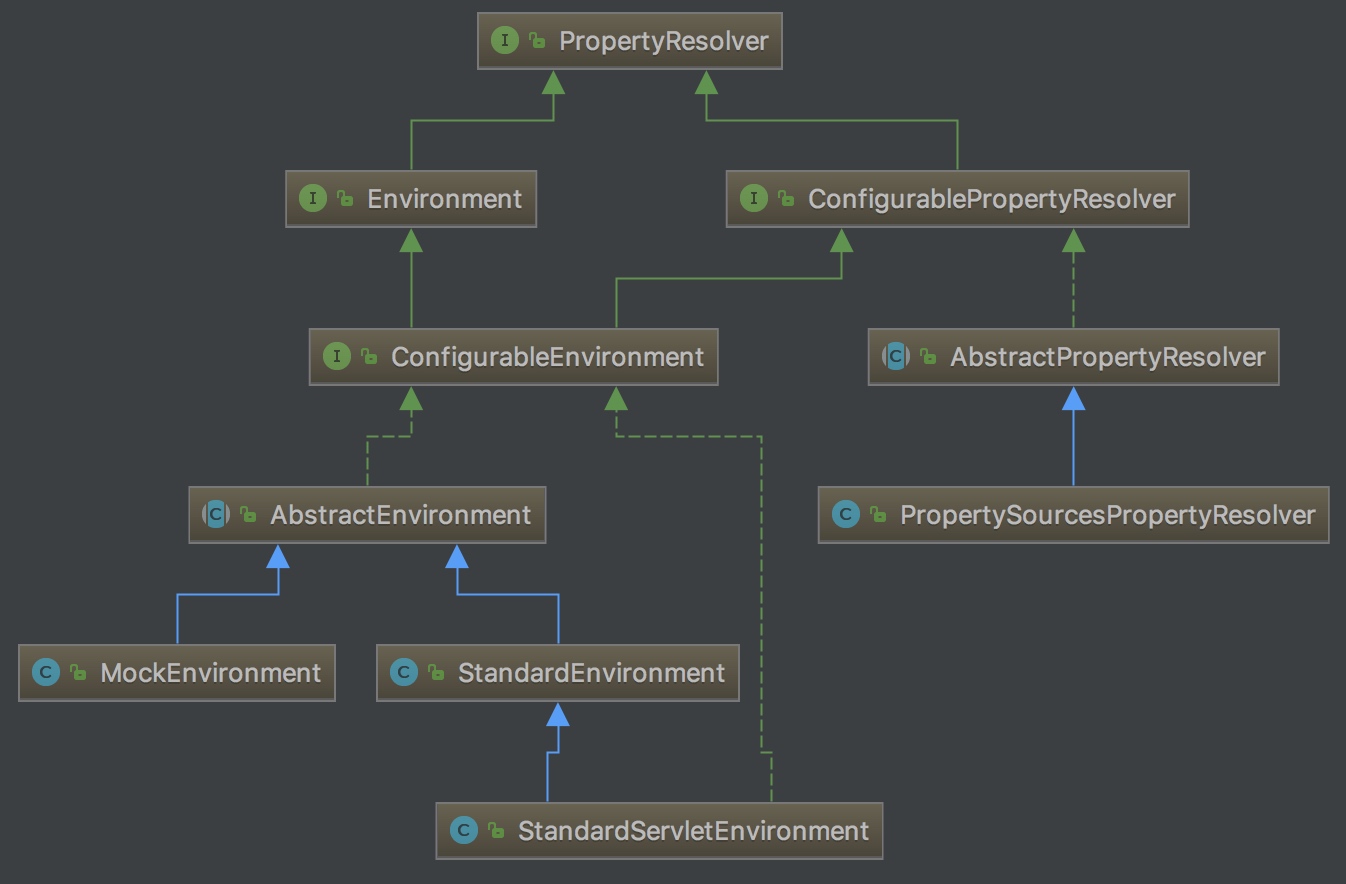
整体类图
下面就针对上面结构图对 Spring 的 Properties & Environment 做一个详细的分析。
2. Properties
2.1 PropertyResolver
属性解析器,用于解析任何基础源的属性的接口
```plain text java // PropertyResolver.java public interface PropertyResolver { // 是否包含某个属性 boolean containsProperty(String key); // 获取属性值 如果找不到返回null @Nullable String getProperty(String key); // 获取属性值,如果找不到返回默认值 String getProperty(String key, String defaultValue); // 获取指定类型的属性值,找不到返回null @Nullable
1
2
3
4
5
6
7

---

从 API 上面我们就知道属性解析器 PropertyResolver 的作用了。下面是一个简单的运用。

```plain text
java PropertyResolver propertyResolver = new PropertySourcesPropertyResolver(propertySources);  System.out.println(propertyResolver.getProperty("name")); System.out.println(propertyResolver.getProperty("name", "chenssy")); System.out.println(propertyResolver.resolvePlaceholders("my name is  ${name}"));
下图是 PropertyResolver 体系结构图:

- ConfigurablePropertyResolver:供属性类型转换的功能
- AbstractPropertyResolver:解析属性文件的抽象基类
- PropertySourcesPropertyResolver:PropertyResolver 的实现者,他对一组 PropertySources 提供属性解析服务
2.2 ConfigurablePropertyResolver
提供属性类型转换的功能
通俗点说就是 ConfigurablePropertyResolver 提供属性值类型转换所需要的 ConversionService。代码如下:
```plain text java // ConfigurablePropertyResolver.java public interface ConfigurablePropertyResolver extends PropertyResolver { // 返回执行类型转换时使用的 ConfigurableConversionService ConfigurableConversionService getConversionService(); // 设置 ConfigurableConversionService void setConversionService(ConfigurableConversionService conversionService); // 设置占位符前缀 void setPlaceholderPrefix(String placeholderPrefix); // 设置占位符后缀 void setPlaceholderSuffix(String placeholderSuffix); // 设置占位符与默认值之间的分隔符 void setValueSeparator(@Nullable String valueSeparator); // 设置当遇到嵌套在给定属性值内的不可解析的占位符时是否抛出异常 // 当属性值包含不可解析的占位符时,getProperty(String)及其变体的实现必须检查此处设置的值以确定正确的行为。 void setIgnoreUnresolvableNestedPlaceholders(boolean ignoreUnresolvableNestedPlaceholders); // 指定必须存在哪些属性,以便由validateRequiredProperties()验证 void setRequiredProperties(String… requiredProperties); // 验证setRequiredProperties指定的每个属性是否存在并解析为非null值 void validateRequiredProperties() throws MissingRequiredPropertiesException; }
1
2
3
4
5
6
7
8
9
10
11
12
13
14
15
16
17

---

- 从 ConfigurablePropertyResolver 所提供的方法来看,除了访问和设置 ConversionService 外,主要还提供了一些解析规则之类的方法。

就 Properties 体系而言,PropertyResolver 定义了访问 Properties 属性值的方法,而 ConfigurablePropertyResolver 则定义了解析 Properties 一些相关的规则和值进行类型转换所需要的 Service。

该体系有两个实现者:AbstractPropertyResolver 和 PropertySourcesPropertyResolver,其中 AbstractPropertyResolver 为实现的抽象基类,PropertySourcesPropertyResolver 为真正的实现者。

## 2.3 AbstractPropertyResolver

解析属性文件的抽象基类

AbstractPropertyResolver 作为基类它仅仅只是设置了一些解析属性文件所需要配置或者转换器,如 #setConversionService(…)、#setPlaceholderPrefix(…)、#setValueSeparator(…) 。其实这些方法的实现都比较简单,都是设置或者获取 AbstractPropertyResolver 所提供的属性,代码如下:

```plain text
java // AbstractPropertyResolver.java  // 类型转换去 private volatile ConfigurableConversionService conversionService; // 占位符 private PropertyPlaceholderHelper nonStrictHelper; // private PropertyPlaceholderHelper strictHelper; // 设置是否抛出异常 private boolean ignoreUnresolvableNestedPlaceholders = false; // 占位符前缀 private String placeholderPrefix = SystemPropertyUtils.PLACEHOLDER_PREFIX; // 占位符后缀 private String placeholderSuffix = SystemPropertyUtils.PLACEHOLDER_SUFFIX; // 与默认值的分割 private String valueSeparator = SystemPropertyUtils.VALUE_SEPARATOR; // 必须要有的字段值 private final Set<String> requiredProperties = new LinkedHashSet<>();
这些属性都是 ConfigurablePropertyResolver 接口所提供方法需要的属性,他所提供的方法都是设置和读取这些值,如下几个方法:
```plain text java // AbstractPropertyResolver.java public ConfigurableConversionService getConversionService() { // 需要提供独立的DefaultConversionService,而不是PropertySourcesPropertyResolver 使用的共享DefaultConversionService。 ConfigurableConversionService cs = this.conversionService; if (cs == null) { synchronized (this) { cs = this.conversionService; if (cs == null) { cs = new DefaultConversionService(); this.conversionService = cs; } } } return cs; } @Override public void setConversionService(ConfigurableConversionService conversionService) { Assert.notNull(conversionService, “ConversionService must not be null”); this.conversionService = conversionService; } public void setPlaceholderPrefix(String placeholderPrefix) { Assert.notNull(placeholderPrefix, “‘placeholderPrefix’ must not be null”); this.placeholderPrefix = placeholderPrefix; } public void setPlaceholderSuffix(String placeholderSuffix) { Assert.notNull(placeholderSuffix, “‘placeholderSuffix’ must not be null”); this.placeholderSuffix = placeholderSuffix; }
1
2
3
4
5
6
7

---

而对属性的访问,则委托给子类 PropertySourcesPropertyResolver 实现。

```plain text
java // AbstractPropertyResolver.java  public String getProperty(String key) { return getProperty(key, String.class); }  public String getProperty(String key, String defaultValue) {     String value = getProperty(key);     return (value != null ? value : defaultValue); }  public <T> T getProperty(String key, Class<T> targetType, T defaultValue) {     T value = getProperty(key, targetType);     return (value != null ? value : defaultValue); }  public String getRequiredProperty(String key) throws IllegalStateException {     String value = getProperty(key);     if (value == null) {         throw new IllegalStateException("Required key '" + key + "' not found");     }     return value; }  public <T> T getRequiredProperty(String key, Class<T> valueType) throws IllegalStateException { T value = getProperty(key, valueType); if (value == null) {     throw new IllegalStateException("Required key '" + key + "' not found"); } return value; }
2.4 PropertySourcesPropertyResolver
PropertyResolver 的实现者,他对一组 PropertySources 提供属性解析服务
它仅有一个成员变量:PropertySources 。该成员变量内部存储着一组 PropertySource,表示 key-value 键值对的源的抽象基类,即一个 PropertySource 对象则是一个 key-value 键值对。PropertySource 的代码如下:
```plain text java // PropertySource.java public abstract class PropertySource
1
2
3
4
5
6
7
8
9
10
11
12
13
14
15
16
17
18

---

---

PropertySourcesPropertyResolver 对外公开的 #getProperty(…) 方法,都是委托给 #getProperty(String key, Class targetValueType, boolean resolveNestedPlaceholders) 方法实现,他有三个参数,分别表示为:

- key
:获取的 key 。
- targetValueType
: 目标 value 的类型。
- resolveNestedPlaceholders
:是否解决嵌套占位符。

源码如下:

```plain text
java // PropertySourcesPropertyResolver.java  @Nullable protected <T> T getProperty(String key, Class<T> targetValueType, boolean resolveNestedPlaceholders) {     if (this.propertySources != null) {         // 遍历 propertySources 数组         for (PropertySource<?> propertySource : this.propertySources) {             if (logger.isTraceEnabled()) {                 logger.trace("Searching for key '" + key + "' in PropertySource '" +                              propertySource.getName() + "'");             }             // 获得 key 对应的 value 值             Object value = propertySource.getProperty(key);             if (value != null) {                 // 如果解决嵌套占位符,解析占位符                 if (resolveNestedPlaceholders && value instanceof String) {                     value = resolveNestedPlaceholders((String) value);                 }                 // 如果未找到 key 对应的值,则打印日志                 logKeyFound(key, propertySource, value);                 // value 的类型转换                 return convertValueIfNecessary(value, targetValueType);             }         }     }     if (logger.isTraceEnabled()) {         logger.trace("Could not find key '" + key + "' in any property source");     }     return null; }
- 首先,从 propertySource 中,获取指定 key 的 value 值。
- 然后,判断是否需要进行嵌套占位符解析,如果需要则调用 「2.4.1 resolveNestedPlaceholders」 #resolveNestedPlaceholders(String value) 方法,进行嵌套占位符解析。详细解析,见 。
- 最后,调用 「2.4.2 convertValueIfNecessary」 #convertValueIfNecessary(Object value, Class targetType) 方法,进行类型转换。详细解析,见 。
2.4.1 resolveNestedPlaceholders
#resolveNestedPlaceholders(String value) 方法,用于解析给定字符串中的占位符,同时根据 ignoreUnresolvableNestedPlaceholders 的值,来确定是否对不可解析的占位符的处理方法:是忽略还是抛出异常(该值由 #setIgnoreUnresolvableNestedPlaceholders(boolean ignoreUnresolvableNestedPlaceholders) 方法来设置)。代码如下:
```plain text java // AbstractPropertyResolver.java protected String resolveNestedPlaceholders(String value) { return (this.ignoreUnresolvableNestedPlaceholders ? resolvePlaceholders(value) : resolveRequiredPlaceholders(value)); }
1
2
3
4
5
6
7
8
9
10
11
12
13
14
15
16
17

---

- 如果
this.ignoreUnresolvableNestedPlaceholders
为
true
,则调用
#resolvePlaceholders(String text)
方法,否则调用
#resolveRequiredPlaceholders(String text)
方法,但是无论是哪个方法,最终都会到
#doResolvePlaceholders(String text, PropertyPlaceholderHelper helper)
方法。该方法接收两个参数:

```plain text
java // AbstractPropertyResolver.java  // String 类型的 text:待解析的字符串 // PropertyPlaceholderHelper 类型的 helper:用于解析占位符的工具类。 private String doResolvePlaceholders(String text, PropertyPlaceholderHelper helper) {     return helper.replacePlaceholders(text, this::getPropertyAsRawString); }
PropertyPlaceholderHelper 是用于处理包含占位符值的字符串,构造该实例需要四个参数:
- placeholderPrefix :占位符前缀。
- placeholderSuffix :占位符后缀。
- valueSeparator :占位符变量与关联的默认值之间的分隔符。
- ignoreUnresolvablePlaceholders :指示是否忽略不可解析的占位符( true )或抛出异常( false )。
- 构造函数如下:
```plain text java // PropertyPlaceholderHelper.java public PropertyPlaceholderHelper(String placeholderPrefix, String placeholderSuffix, @Nullable String valueSeparator, boolean ignoreUnresolvablePlaceholders) { Assert.notNull(placeholderPrefix, “‘placeholderPrefix’ must not be null”); Assert.notNull(placeholderSuffix, “‘placeholderSuffix’ must not be null”); this.placeholderPrefix = placeholderPrefix; this.placeholderSuffix = placeholderSuffix; String simplePrefixForSuffix = wellKnownSimplePrefixes.get(this.placeholderSuffix); if (simplePrefixForSuffix != null && this.placeholderPrefix.endsWith(simplePrefixForSuffix)) { this.simplePrefix = simplePrefixForSuffix; } else { this.simplePrefix = this.placeholderPrefix; } this.valueSeparator = valueSeparator; this.ignoreUnresolvablePlaceholders = ignoreUnresolvablePlaceholders; }
1
2
3
4
5
6
7
8
9
10
11
12
13
14
15
16
17
18
19
20
21
22
23
24
25
26

---

就 PropertySourcesPropertyResolver 而言,其父类 AbstractPropertyResolver 已经对上述四个值做了定义:

- placeholderPrefix
为
${
。
- placeholderSuffix
为
}
。
- valueSeparator
为
:
。
- ignoreUnresolvablePlaceholders
,默认为
false
,当然我们也可以使用相应的 setter 方法自定义。

调用 PropertyPlaceholderHelper 的 #replacePlaceholders(String value, PlaceholderResolver placeholderResolver) 方法,对占位符进行处理,该方法接收两个参数,一个是待解析的字符串 value ,一个是 PlaceholderResolver 类型的 placeholderResolver ,他是定义占位符解析的策略类。代码如下:

```plain text
java // PropertyPlaceholderHelper.java  public String replacePlaceholders(String value, PlaceholderResolver placeholderResolver) {     Assert.notNull(value, "'value' must not be null");     return parseStringValue(value, placeholderResolver, new HashSet<>()); }  protected String parseStringValue(String value, PlaceholderResolver placeholderResolver, Set<String> visitedPlaceholders) {     StringBuilder result = new StringBuilder(value);      // 获取前缀 "${" 的索引位置     int startIndex = value.indexOf(this.placeholderPrefix);     while (startIndex != -1) {         // 获取 后缀 "}" 的索引位置         int endIndex = findPlaceholderEndIndex(result, startIndex);         if (endIndex != -1) {             // 截取 "${" 和 "}" 中间的内容,这也就是我们在配置文件中对应的值             String placeholder = result.substring(startIndex + this.placeholderPrefix.length(), endIndex);             String originalPlaceholder = placeholder;             if (!visitedPlaceholders.add(originalPlaceholder)) {                 throw new IllegalArgumentException(                     "Circular placeholder reference '" + originalPlaceholder + "' in property definitions");             }             // Recursive invocation, parsing placeholders contained in the placeholder key.             // 解析占位符键中包含的占位符,真正的值             placeholder = parseStringValue(placeholder, placeholderResolver, visitedPlaceholders);             // Now obtain the value for the fully resolved key...             // 从 Properties 中获取 placeHolder 对应的值 propVal             String propVal = placeholderResolver.resolvePlaceholder(placeholder);             // 如果不存在             if (propVal == null && this.valueSeparator != null) {                 // 查询 : 的位置                 int separatorIndex = placeholder.indexOf(this.valueSeparator);                 // 如果存在 :                 if (separatorIndex != -1) {                     // 获取 : 前面部分 actualPlaceholder                     String actualPlaceholder = placeholder.substring(0, separatorIndex);                     // 获取 : 后面部分 defaultValue                     String defaultValue = placeholder.substring(separatorIndex + this.valueSeparator.length());                     // 从 Properties 中获取 actualPlaceholder 对应的值                     propVal = placeholderResolver.resolvePlaceholder(actualPlaceholder);                     // 如果不存在 则返回 defaultValue                     if (propVal == null) {                         propVal = defaultValue;                     }                 }             }             if (propVal != null) {                 // Recursive invocation, parsing placeholders contained in the                 // previously resolved placeholder value.                 propVal = parseStringValue(propVal, placeholderResolver, visitedPlaceholders);                 result.replace(startIndex, endIndex + this.placeholderSuffix.length(), propVal);                 if (logger.isTraceEnabled()) {                     logger.trace("Resolved placeholder '" + placeholder + "'");                 }                 startIndex = result.indexOf(this.placeholderPrefix, startIndex + propVal.length());             } else if (this.ignoreUnresolvablePlaceholders) {                 // Proceed with unprocessed value.                 // 忽略值                 startIndex = result.indexOf(this.placeholderPrefix, endIndex + this.placeholderSuffix.length());             } else {                 throw new IllegalArgumentException("Could not resolve placeholder '" +                         placeholder + "'" + " in value \"" + value + "\"");             }             visitedPlaceholders.remove(originalPlaceholder);         } else {             startIndex = -1;         }     }      // 返回propVal,就是替换之后的值     return result.toString(); }
- 其实就是获取占位符 ${}</font> 中间的值,这里面会涉及到一个递归的过程,因为可能会存在这种情况 ${${name}} 。
2.5 convertValueIfNecessary
#convertValueIfNecessary(Object value, Class targetType) 方法,是不是感觉到非常的熟悉,该方法就是完成类型转换的。代码如下:
1
// AbstractPropertyResolver.java@Nullableprotected <T> T convertValueIfNecessary(Object value, @Nullable Class<T> targetType) {    if (targetType == null) {        return (T) value;    }    ConversionService conversionServiceToUse = this.conversionService;    if (conversionServiceToUse == null) {        // Avoid initialization of shared DefaultConversionService if        // no standard type conversion is needed in the first place...        if (ClassUtils.isAssignableValue(targetType, value)) {            return (T) value;        }        conversionServiceToUse = DefaultConversionService.getSharedInstance();    }    // 执行转换    return conversionServiceToUse.convert(value, targetType);}
- 首先,获取类型转换服务 conversionService 。若为空,则判断是否可以通过反射来设置,如果可以则直接强转返回,否则构造一个 DefaultConversionService 实例。
- 最后调用其【死磕 Spring】—— IoC 之深入分析 Bean 的类型转换体系 #convert(Object source, Class targetType) 方法,完成类型转换。后续就是 Spring 类型转换体系的事情了,如果对其不了解,可以参考小编这篇博客:
3. Environment
表示当前应用程序正在运行的环境
应用程序的环境有两个关键方面:profile 和 properties。
- properties 的方法由 PropertyResolver 定义。
- profile 则表示当前的运行环境,对于应用程序中的 properties 而言,并不是所有的都会加载到系统中,只有其属性与 profile 一直才会被激活加载,
所以 Environment 对象的作用,是确定哪些配置文件(如果有)当前处于活动状态,以及默认情况下哪些配置文件(如果有)应处于活动状态。properties 在几乎所有应用程序中都发挥着重要作用,并且有多种来源:属性文件,JVM 系统属性,系统环境变量,JNDI,servlet 上下文参数,ad-hoc 属性对象,映射等。同时它继承 PropertyResolver 接口,所以与属性相关的 Environment 对象其主要是为用户提供方便的服务接口,用于配置属性源和从中属性源中解析属性。
代码如下:
1
// Environment.javapublic interface Environment extends PropertyResolver {    // 返回此环境下激活的配置文件集    String[] getActiveProfiles();    // 如果未设置激活配置文件,则返回默认的激活的配置文件集    String[] getDefaultProfiles();    boolean acceptsProfiles(String... profiles);}
Environment 体系结构图如下:
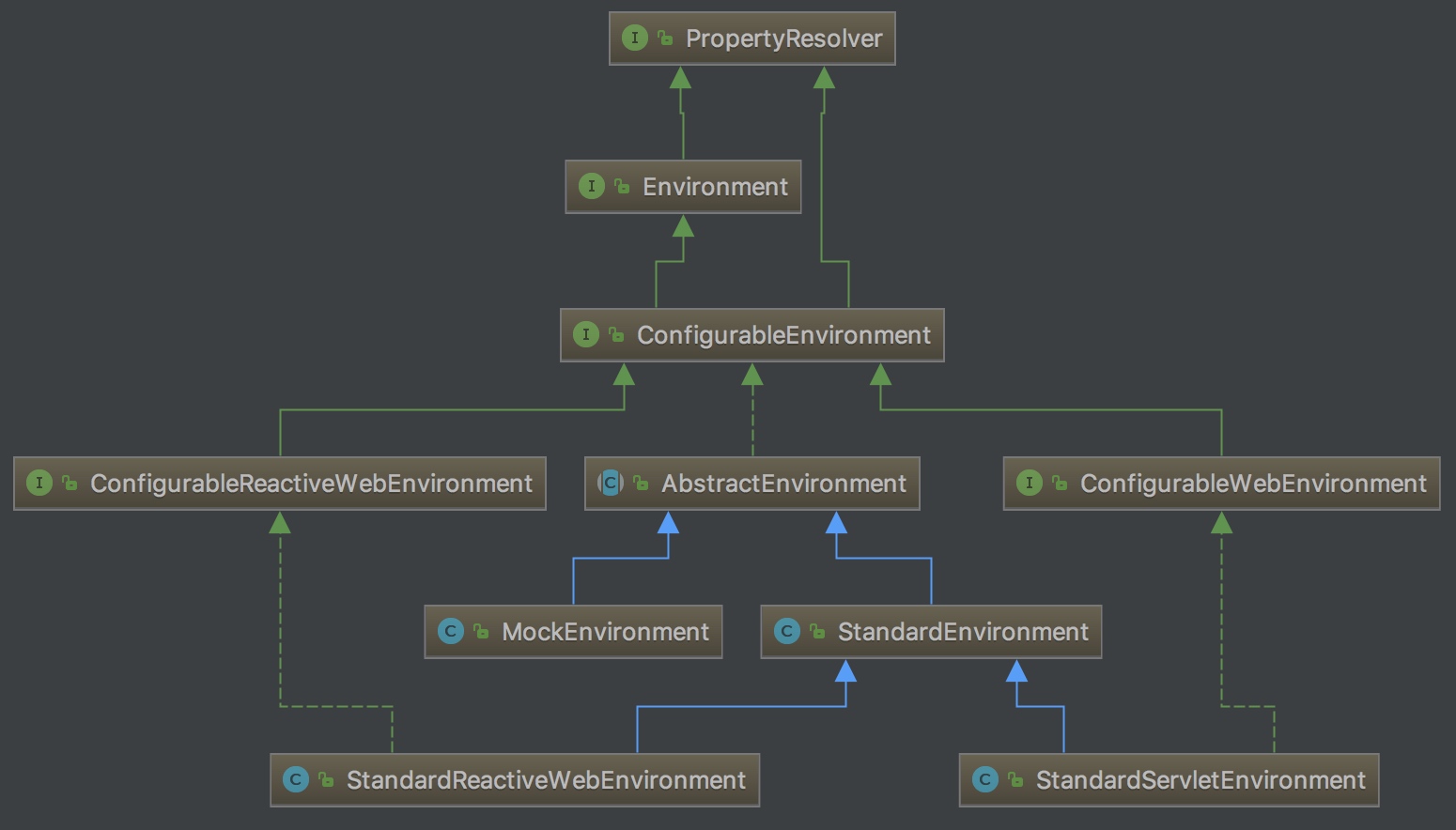
Environment 类图
- PropertyResolver:提供属性访问功能
- Environment:提供访问和判断 profiles 的功能
- ConfigurableEnvironment:提供设置激活的 profile 和默认的 profile 的功能以及操作 Properties 的工具
- ConfigurableWebEnvironment:提供配置 Servlet 上下文和 Servlet 参数的功能
- AbstractEnvironment:实现了 ConfigurableEnvironment 接口,默认属性和存储容器的定义,并且实现了 ConfigurableEnvironment 的方法,并且为子类预留可覆盖了扩展方法
- StandardEnvironment:继承自 AbstractEnvironment ,非 Servlet(Web) 环境下的标准 Environment 实现
- StandardServletEnvironment:继承自 StandardEnvironment ,Servlet(Web) 环境下的标准 Environment 实现
3.1 ConfigurableEnvironment
提供设置激活的 profile 和默认的 profile 的功能以及操作 Properties 的工具
该类除了继承 Environment 接口外还继承了 ConfigurablePropertyResolver 接口,所以它即具备了设置 profile 的功能也具备了操作 Properties 的功能。同时还允许客户端通过它设置和验证所需要的属性,自定义转换服务等功能。如下:
1
// ConfigurableEnvironment.javapublic interface ConfigurableEnvironment extends Environment, ConfigurablePropertyResolver {    // 指定该环境下的 profile 集    void setActiveProfiles(String... profiles);    // 增加此环境的 profile    void addActiveProfile(String profile);    // 设置默认的 profile    void setDefaultProfiles(String... profiles);    // 返回此环境的 PropertySources    MutablePropertySources getPropertySources();   // 尝试返回 System.getenv() 的值,若失败则返回通过 System.getenv(string) 的来访问各个键的映射    Map<String, Object> getSystemEnvironment();    // 尝试返回 System.getProperties() 的值,若失败则返回通过 System.getProperties(string) 的来访问各个键的映射    Map<String, Object> getSystemProperties();    void merge(ConfigurableEnvironment parent);}
3.2 AbstractEnvironment
Environment 的基础实现
允许通过设置 ACTIVE_PROFILES_PROPERTY_NAME 和DEFAULT_PROFILES_PROPERTY_NAME 属性指定活动和默认配置文件。子类的主要区别在于它们默认添加的 PropertySource 对象。而 AbstractEnvironment 则没有添加任何内容。
- 子类应该通过受保护的 #customizePropertySources(MutablePropertySources) 钩子提供属性源。方法的代码如下:
```plain text java // AbstractEnvironment.java public AbstractEnvironment() { customizePropertySources(this.propertySources); } protected void customizePropertySources(MutablePropertySources propertySources) { }
1
2
3
4
5
6
7
8
9

---

- 而客户端应该使用
AbstractEnvironment#getPropertySources()
方法,进行自定义并对 MutablePropertySources API 进行操作。方法的代码如下:

```plain text
java // AbstractEnvironment.java  @Override public MutablePropertySources getPropertySources() {     return this.propertySources; }
在 AbstractEnvironment 有两对变量,这两对变量维护着激活和默认配置 profile。如下:
```plain text java // AbstractEnvironment.java public static final String ACTIVE_PROFILES_PROPERTY_NAME = “spring.profiles.active”; private final Set
1
2
3
4
5
6
7
8
9
10
11
12
13

---

- 由于实现方法较多,这里只关注两个方法:
#setActiveProfiles(String… profiles)
和
#getActiveProfiles()
。

### 3.2.1 setActiveProfiles

```plain text
java // AbstractEnvironment.java  @Override public void setActiveProfiles(String... profiles) {     Assert.notNull(profiles, "Profile array must not be null");     if (logger.isDebugEnabled()) {         logger.debug("Activating profiles " + Arrays.asList(profiles));     }     synchronized (this.activeProfiles) {         // 清空 activeProfiles         this.activeProfiles.clear();         // 遍历 profiles 数组,添加到 activeProfiles 中         for (String profile : profiles) {             // 校验             validateProfile(profile);             this.activeProfiles.add(profile);         }     } }
- 该方法其实就是操作 activeProfiles 集合,在每次设置之前都会将该集合清空重新添加,添加之前调用 #validateProfile(String profile) 方法,对添加的 profile 进行校验,如下:
```plain text java // AbstractEnvironment.java protected void validateProfile(String profile) { if (!StringUtils.hasText(profile)) { throw new IllegalArgumentException(“Invalid profile [” + profile + “]: must contain text”); } if (profile.charAt(0) == ‘!’) { throw new IllegalArgumentException(“Invalid profile [” + profile + “]: must not begin with ! operator”); } }
1
2
3
4
5

---

```plain text
- <font style="color:rgb(51, 51, 51);">这个校验过程比较弱,子类可以提供更加严格的校验规则。</font>
3.2.2 getActiveProfile
从 getActiveProfiles() 方法,中我们可以猜出这个方法实现的逻辑:获取 activeProfiles 集合即可。代码如下:
```plain text java // AbstractEnvironment.java public String[] getActiveProfiles() { return StringUtils.toStringArray(doGetActiveProfiles()); }
1
2
3
4
5
6
7
8
9

---

- 委托给
#doGetActiveProfiles()
方法,代码实现:

```plain text
java // AbstractEnvironment.java  protected Set<String> doGetActiveProfiles() {     synchronized (this.activeProfiles) {         // 如果 activeProfiles 为空,则进行初始化         if (this.activeProfiles.isEmpty()) {             // 获得 ACTIVE_PROFILES_PROPERTY_NAME 对应的 profiles 属性值             String profiles = getProperty(ACTIVE_PROFILES_PROPERTY_NAME);             if (StringUtils.hasText(profiles)) {                 // 设置到 activeProfiles 中                 setActiveProfiles(StringUtils.commaDelimitedListToStringArray(                     StringUtils.trimAllWhitespace(profiles)));             }         }         return this.activeProfiles;     } }
```plain text
- 如果 activeProfiles 为空,则从 Properties 中获取 spring.profiles.active 配置,如果不为空,则调用 #setActiveProfiles(String... profiles) 方法,设置 profile,最后返回。
```
4. 小结
到这里整个环境&属性已经分析完毕了,至于在后面他是如何与应用上下文结合的,我们后面分析。