元注解
- 元注解
- 元注解概念
- @Target
- @Retention
- @Inherited
- @Documented
- @Repeatable (java1.8 新增)
- @Repeatable 运用举例
元注解
元注解概念
在讲解元注解概念之前,我们先建立元数据的概念。 元数据在英语中对应单词 metadata, metadata在wiki中的解释是:Metadata is data [information] that provides information about other data为其他数据提供信息的数据
这样元注解就好理解了,元注解 meta annotation用于注解 自定义注解 的注解。元注解有这么几种:
- @Target
- @Retention
- @Inherited
- @Documented
- @Repeatable (java1.8 新增)
接下来挨个讲解
@Target
@Target 表示这个注解能放在什么位置上,是只能放在类上?还是即可以放在方法上,又可以放在属性上。自定义注解@JDBCConfig 这个注解上的@Target是:@Target({METHOD,TYPE}),表示他可以用在方法和类型上(类和接口),但是不能放在属性等其他位置。 可以选择的位置列表如下:
- ElementType.TYPE:能修饰类、接口或枚举类型
- ElementType.FIELD:能修饰成员变量
- ElementType.METHOD:能修饰方法
- ElementType.PARAMETER:能修饰参数
- ElementType.CONSTRUCTOR:能修饰构造器
- ElementType.LOCAL_VARIABLE:能修饰局部变量
- ElementType.ANNOTATION_TYPE:能修饰注解
- ElementType.PACKAGE:能修饰包
1
2
3
4
5
6
7
8
9
10
11
12
13
14
15
16
17
18
19
20
21
22
23
package anno;

import static java.lang.annotation.ElementType.METHOD;
import static java.lang.annotation.ElementType.TYPE;
import java.lang.annotation.Documented;
import java.lang.annotation.Inherited;
import java.lang.annotation.Retention;
import java.lang.annotation.RetentionPolicy;
import java.lang.annotation.Target;

@Target({METHOD, TYPE})
@Retention(RetentionPolicy.RUNTIME)
@Inherited
@Documented
public @interface JDBCConfig {

    String ip();
    int port() default 3306;
    String database();
    String encoding();
    String loginName();
    String password();
}
@Retention
@Retention 表示生命周期,RetentionPolicy.RUNTIME, 表示可以在运行的时候依然可以使用。 @Retention可选的值有3个:
- RetentionPolicy.SOURCE: 注解只在源代码中存在,编译成class之后,就没了。@Override 就是这种注解。
- RetentionPolicy.CLASS: 注解在java文件编程成.class文件后,依然存在,但是运行起来后就没了。@Retention的默认值,即当没有显式指定@Retention的时候,就会是这种类型。
- RetentionPolicy.RUNTIME: 注解在运行起来之后依然存在,程序可以通过反射获取这些信息,自定义注解@JDBCConfig 就是这样。
大家可以试试把自定义注解@JDBCConfig的@Retention改成其他两种,并且运行起来,看看有什么不同
1
2
3
4
5
6
7
8
9
10
11
12
13
14
15
16
17
18
19
20
21
22
23
package anno;

import static java.lang.annotation.ElementType.METHOD;
import static java.lang.annotation.ElementType.TYPE;
import java.lang.annotation.Documented;
import java.lang.annotation.Inherited;
import java.lang.annotation.Retention;
import java.lang.annotation.RetentionPolicy;
import java.lang.annotation.Target;

@Target({METHOD, TYPE})
@Retention(RetentionPolicy.RUNTIME)
@Inherited
@Documented
public @interface JDBCConfig {

    String ip();
    int port() default 3306;
    String database();
    String encoding();
    String loginName();
    String password();
}
@Inherited
@Inherited 表示该注解具有继承性。如例,设计一个DBUtil的子类,其getConnection2方法,可以获取到父类DBUtil上的注解信息。
1
2
3
4
5
6
7
8
9
10
11
12
13
14
15
16
17
18
19
20
21
22
23
24
25
26
27
28
29
30
31
32
33
34
package util;

import java.sql.Connection;
import java.sql.DriverManager;
import java.sql.SQLException;
import anno.JDBCConfig;

public class DBUtilChild extends DBUtil {

    public static Connection getConnection2()
    throws SQLException, NoSuchMethodException, SecurityException {

        JDBCConfig config = DBUtilChild.class.getAnnotation(JDBCConfig.class);
        String ip = config.ip();
        int port = config.port();
        String database = config.database();
        String encoding = config.encoding();
        String loginName = config.loginName();
        String password = config.password();

        String url = String.format(
        "jdbc:mysql://%s:%d/%s?characterEncoding=%s",
        ip, port, database, encoding);
        return DriverManager.getConnection(url, loginName, password);
    }

    public static void main(String[] args)
    throws NoSuchMethodException, SecurityException, SQLException {
        Connection c = getConnection2();
        System.out.println(c);
    }
}
@Documented
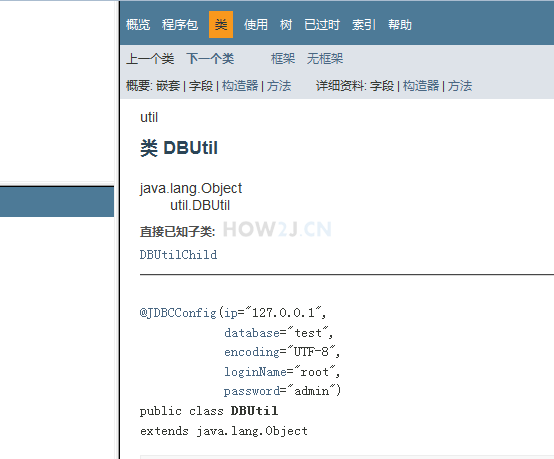
@Documented 如图所示, 在用javadoc命令生成API文档后,DBUtil的文档里会出现该注解说明。
注: 使用eclipse把项目中的.java文件导成API文档步骤:1. 选中项目2. 点开菜单File3. 点击Export4. 点开java->javadoc->点next5. 点finish
@Repeatable (java1.8 新增)
当没有@Repeatable修饰的时候,注解在同一个位置,只能出现一次,如例所示:@JDBCConfig(ip = “127.0.0.1”, database = “test”, encoding = “UTF-8”, loginName = “root”, password = “admin”)@JDBCConfig(ip = “127.0.0.1”, database = “test”, encoding = “UTF-8”, loginName = “root”, password = “admin”)重复做两次就会报错了。使用@Repeatable之后,再配合一些其他动作,就可以在同一个地方使用多次了。如何使用@Repeatable 单独拿出来讲解:@Repeatable运用举例
1
2
3
4
5
6
7
8
9
10
11
12
13
14
15
16
17
18
19
20
21
22
23
24
25
26
27
28
29
30
31
32
33
34
35
36
37
38
39
40
41
42
43
44
45
46
47
48
49
50
51
52
53
54
55
56
package util;

import java.sql.Connection;
import java.sql.DriverManager;
import java.sql.SQLException;
import anno.JDBCConfig;

@JDBCConfig(
ip = "127.0.0.1",
database = "test",
encoding = "UTF-8",
loginName = "root",
password = "admin"
)
@JDBCConfig(
ip = "127.0.0.1",
database = "test",
encoding = "UTF-8",
loginName = "root",
password = "admin"
)
public class DBUtil {

    static {
        try {
            Class.forName("com.mysql.jdbc.Driver");
        } catch (ClassNotFoundException e) {
            e.printStackTrace();
        }
    }

    public static Connection getConnection()
    throws SQLException, NoSuchMethodException, SecurityException {

        JDBCConfig config = DBUtil.class.getAnnotation(JDBCConfig.class);
        System.out.println(config);

        String ip = config.ip();
        int port = config.port();
        String database = config.database();
        String encoding = config.encoding();
        String loginName = config.loginName();
        String password = config.password();

        String url = String.format(
        "jdbc:mysql://%s:%d/%s?characterEncoding=%s",
        ip, port, database, encoding);
        return DriverManager.getConnection(url, loginName, password);
    }

    public static void main(String[] args)
    throws NoSuchMethodException, SecurityException, SQLException {
        Connection c = getConnection();
        System.out.println(c);
    }
}
@Repeatable 运用举例
比如在练习练习-查找文件内容 中有一个要求,即查找文件后缀名是.java的文件,我们把部分代码修改为注解,并且使用@Repeatable 这个元注解来表示,文件后缀名的范围可以是java, html, css, js 等等。
为了紧凑起见,把注解作为内部类的形式放在一个文件里。1. 注解FileTypes,其value()返回一个FileType数组2. 注解FileType,其@Repeatable的值采用FileTypes3. 运用注解:在work方法上重复使用多次@FileType注解4. 解析注解: 在work方法内,通过反射获取到本方法上的FileType类型的注解数组,然后遍历本数组
1
2
3
4
5
6
7
8
9
10
11
12
13
14
15
16
17
18
19
20
21
22
23
24
25
26
27
28
29
30
31
32
33
34
35
36
37
38
39
40
41
42
43
44
45
46
47
48
package annotation;

import static java.lang.annotation.ElementType.METHOD;
import java.lang.annotation.Repeatable;
import java.lang.annotation.Retention;
import java.lang.annotation.RetentionPolicy;
import java.lang.annotation.Target;

public class FindFiles {

    @Target(METHOD)
    @Retention(RetentionPolicy.RUNTIME)
    public @interface FileTypes {
        FileType[] value();
    }

    @Target(METHOD)
    @Retention(RetentionPolicy.RUNTIME)
    @Repeatable(FileTypes.class)
    public @interface FileType {
        String value();
    }

    @FileType(".java")
    @FileType(".html")
    @FileType(".css")
    @FileType(".js")
    public void work() {
        try {
            FileType[] fileTypes = this.getClass()
            .getMethod("work")
            .getAnnotationsByType(FileType.class);

            System.out.println("将从如下后缀名的文件中查找文件内容");
            for (FileType fileType : fileTypes) {
                System.out.println(fileType.value());
            }
            System.out.println("查找过程略。。。");
        } catch (NoSuchMethodException | SecurityException e) {
            e.printStackTrace();
        }
    }
}

public static void main(String[] args) {
    new FindFiles().work();
}
}